Overhead office workspace with team members using laptops, smartphones, and external drives during a collaborative work session.

SailPoint Configuration Hub - Backup & Deployment Guide

Date Posted:

Category:

Security

Author:

Bhavithra

Overhead office workspace with team members using laptops, smartphones, and external drives during a collaborative work session.

SailPoint Configuration Hub - Backup & Deployment Guide

Date Posted:

Category:

Security

Author:

Bhavithra

Overhead office workspace with team members using laptops, smartphones, and external drives during a collaborative work session.

SailPoint Configuration Hub - Backup & Deployment Guide

Date Posted:

Category:

Security

Author:

Bhavithra

Introduction to SailPoint Configuration Hub

The SailPoint Configuration Hub maintains configuration objects using the UI for backup and deployment. We can perform these activities using the API using SP-Config. Anyone who has logged in as an administrator can access the Configuration Hub.

The source tenant, also known as the connected tenant, is where we need to create a backup of configuration objects. The target tenant is also known as the live tenant, and this is where we deploy the configuration.

The Configuration Hub does not make full system backups. We can backup configurations such as Sources and Identity Profiles, restore them in case of configuration problems or loss, or migrate and deploy them to other tenants.

Configuration objects

OBJECT 

OBJECT TYPE 

OBJECT 

OBJECT TYPE 

Access Profiles

ACCESS_PROFILE 

Identity Object Configuration

IDENTITY_OBJECT_ CONFIG 

Access Request Configuration

ACCESS_REQUEST_ CONFIG 

Identity Profiles 

IDENTITY_PROFILE 

Attribute Sync Source Configuration

ATTR_SYNC_SOURCE_CONFIG 

Lifecycle States

LIFECYCLE_STATE 

Authentication Configuration 

AUTH_ORG 

Notification Templates

NOTIFICATION_ TEMPLATE 

Campaign Filters 

CAMPAIGN_FILTER 

Password Policies

PASSWORD_POLICY 

Form Definitions 

FORM_DEFINITION 

Password Sync Groups

PASSWORD_SYNC_GROUP

Governance Groups

GOVERNANCE_GROUP

Public Identities Configuration

PUBLIC_IDENTITIES_ CONFIG 

Roles 

ROLE 

Sources 

SOURCE 

Rules 

RULE 

Tags 

TAG 

Segments 

SEGMENT 

Transforms 

TRANSFORM 

Separation of Duties Policies

SOD_POLICY 

Event Trigger Subscriptions 

TRIGGER_SUBSCRIPTION 

Service Desk Integrations 

SERVICE_DESK_ INTEGRATION 

Workflows 

WORKFLOW 

Accessing the Configuration Hub

We can access the configuration hub via the SailPoint Solution Center.
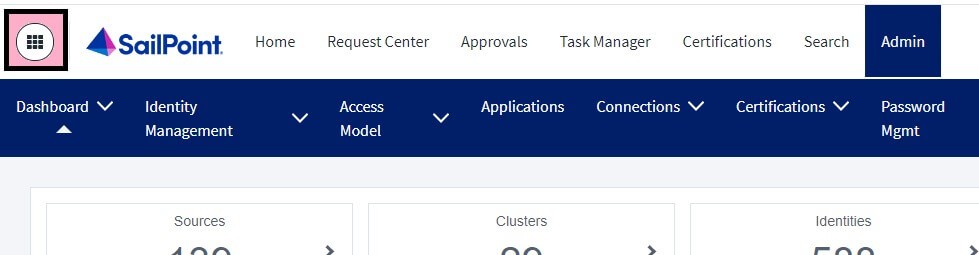
SailPoint IdentityNow Admin dashboard navigation menu with identity management, access model, applications, and certifications options.

Backup Creation

We can make backups of configuration objects manually or automatically.
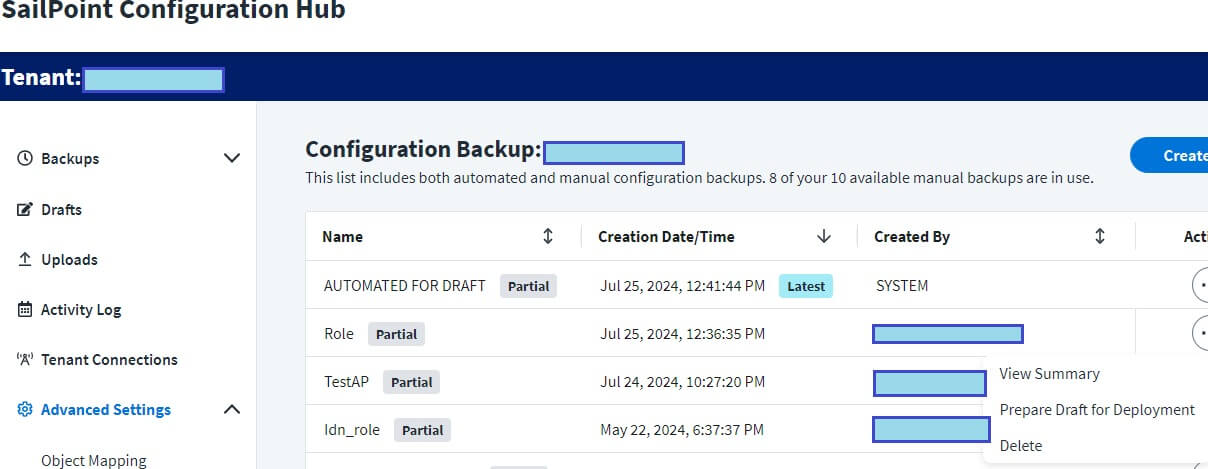
Backup creation page in SailPoint configuration hub

Automatic Backup: SailPoint controls the retention and deletion of the data, and it happens once a week. A maximum of 5 weekly backups can be stored by automated backups, which are identified as Created By: SYSTEM.

Manual Backup: One tenant may have up to 10 manual backups stored at any given time. We can manually start a backup of configuration objects. We have to remove one or more manual backups when it reaches the limit before making another one.
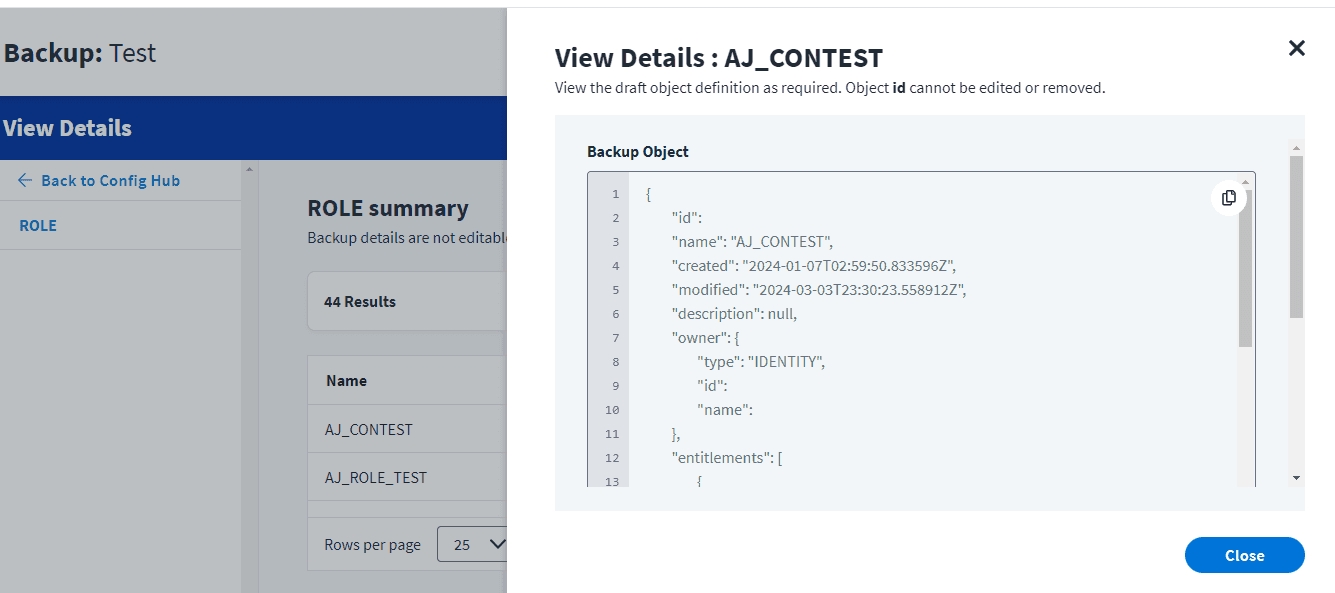
Screenshot of Config Hub backup details showing JSON data for the AJ_CONTEST role.

Backup Restoration/Deployment:

We can restore configurations exactly as they were when the backup was created from automated or manual backup from source tenant.

1. Make a draft to differentiate between the specified backup and target tenant.
2.Edit the draft to select which objects to restore or adjust object details. (Additional options)
3. Deploy the draft to update your live tenants.

Uploading Configuration Files:

Configuration Hub allows the management and deployment of configuration files by uploading a JSON file that contains configuration data. We can upload up to 10 configuration files.
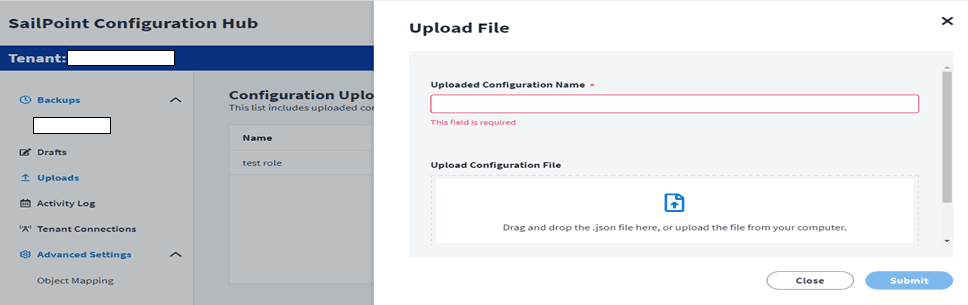
SailPoint IdentityNow Configuration Hub upload screen with required configuration name field and JSON file drag-and-drop upload option.

Backups with up to 30,000 objects can be used to create drafts. For larger backups, enable drafts by contacting SailPoint Support. We can have up to 5 drafts at a time. When you reach this limit, creating a new draft immediately removes the oldest draft that hasn’t been deployed.

We can observe all the changes made to the draft and its objects on the draft summary page as follows,  
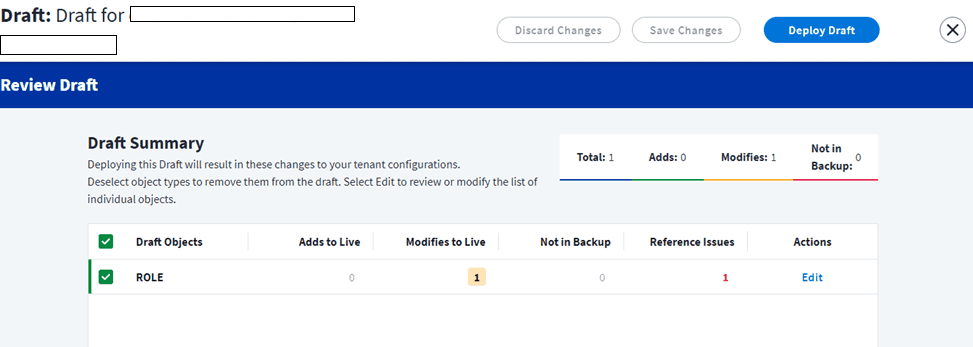
SailPoint IdentityNow Configuration Hub Review Draft page displaying one modified ROLE object with reference issue before deploying draft changes.

Before deploying a draft, we must carefully review the new and modified items to ensure that the correct configuration is being used. Drafts can be deployed with a maximum of 5,000 items. To enable deployment of larger drafts, we can contact SailPoint Support.

Reference issues are caused by references to objects that no longer exist in the tenant, such as a deleted owner identity. Objects from the active tenant are not automatically removed by draft deployment.

Objects that are present in the live tenant but not in the backup are included in the Not in Backup list, which is given as a reference. In your live environment, these objects can be manually removed if needed.

Activity Log:

We can view the results of all completed, failed, or partially completed deployments from activity log.

Failed – All configuration objects in the deployed drafts were failed to deploy.

Complete – All configuration objects in the deployed drafts were successfully deployed.

Partially Complete – Some objects were successfully deployed and some failed.

Actions View:

The Deployment Log – The status of each of the deployed configuration objects.

The Deployment Draft – all the objects that were submitted for deployment.

SEARCH:

We can use search to access audit logs of draft deployments.

Update Config Passed” OR “Update Config Failed”

Conclusion:

The management of identity governance and administration is streamlined and improved by Configuration Hub. The difficulty of managing configuration settings across many tenants has been resolved. The SailPoint Configuration Hub allows the pre-production and production environments to synchronize any necessary configuration changes. It has complete activity logs for all deployments, allowing administrators to trace changes to configuration settings carefully.


Stay tuned to our blog to see more posts about

Sailpoint products implementation and its related updates.

Stay tuned to our blog to see more posts about

Sailpoint products implementation and its related updates.

Category:

Security

Stay tuned to our blog to see more posts about

Sailpoint products implementation and its related updates.

Stay tuned to our blog to see more posts about

Sailpoint products implementation and its related updates.

Category:

Category:

Security

Security

Get your

Tailored Quote for your

Organisation

Get your

Tailored Quote for your

Organisation

Introduction to SailPoint Configuration Hub

The SailPoint Configuration Hub maintains configuration objects using the UI for backup and deployment. We can perform these activities using the API using SP-Config. Anyone who has logged in as an administrator can access the Configuration Hub.

The source tenant, also known as the connected tenant, is where we need to create a backup of configuration objects. The target tenant is also known as the live tenant, and this is where we deploy the configuration.

The Configuration Hub does not make full system backups. We can backup configurations such as Sources and Identity Profiles, restore them in case of configuration problems or loss, or migrate and deploy them to other tenants.

Configuration objects

OBJECT 

OBJECT TYPE 

OBJECT 

OBJECT TYPE 

Access Profiles

ACCESS_PROFILE 

Identity Object Configuration

IDENTITY_OBJECT_ CONFIG 

Access Request Configuration

ACCESS_REQUEST_ CONFIG 

Identity Profiles 

IDENTITY_PROFILE 

Attribute Sync Source Configuration

ATTR_SYNC_SOURCE_CONFIG 

Lifecycle States

LIFECYCLE_STATE 

Authentication Configuration 

AUTH_ORG 

Notification Templates

NOTIFICATION_ TEMPLATE 

Campaign Filters 

CAMPAIGN_FILTER 

Password Policies

PASSWORD_POLICY 

Form Definitions 

FORM_DEFINITION 

Password Sync Groups

PASSWORD_SYNC_GROUP

Governance Groups

GOVERNANCE_GROUP

Public Identities Configuration

PUBLIC_IDENTITIES_ CONFIG 

Roles 

ROLE 

Sources 

SOURCE 

Rules 

RULE 

Tags 

TAG 

Segments 

SEGMENT 

Transforms 

TRANSFORM 

Separation of Duties Policies

SOD_POLICY 

Event Trigger Subscriptions 

TRIGGER_SUBSCRIPTION 

Service Desk Integrations 

SERVICE_DESK_ INTEGRATION 

Workflows 

WORKFLOW 

Accessing the Configuration Hub

We can access the configuration hub via the SailPoint Solution Center.

SailPoint IdentityNow Admin dashboard navigation menu with identity management, access model, applications, and certifications options.

Backup Creation

We can make backups of configuration objects manually or automatically.

Backup creation page in SailPoint configuration hub

Automatic Backup: SailPoint controls the retention and deletion of the data, and it happens once a week. A maximum of 5 weekly backups can be stored by automated backups, which are identified as Created By: SYSTEM.

Manual Backup: One tenant may have up to 10 manual backups stored at any given time. We can manually start a backup of configuration objects. We have to remove one or more manual backups when it reaches the limit before making another one.

Screenshot of Config Hub backup details showing JSON data for the AJ_CONTEST role.

Backup Restoration/Deployment:

We can restore configurations exactly as they were when the backup was created from automated or manual backup from source tenant.

1. Make a draft to differentiate between the specified backup and target tenant.
2.Edit the draft to select which objects to restore or adjust object details. (Additional options)
3. Deploy the draft to update your live tenants.

Uploading Configuration Files:

Configuration Hub allows the management and deployment of configuration files by uploading a JSON file that contains configuration data. We can upload up to 10 configuration files.

SailPoint IdentityNow Configuration Hub upload screen with required configuration name field and JSON file drag-and-drop upload option.

Backups with up to 30,000 objects can be used to create drafts. For larger backups, enable drafts by contacting SailPoint Support. We can have up to 5 drafts at a time. When you reach this limit, creating a new draft immediately removes the oldest draft that hasn’t been deployed.

We can observe all the changes made to the draft and its objects on the draft summary page as follows,  

SailPoint IdentityNow Configuration Hub Review Draft page displaying one modified ROLE object with reference issue before deploying draft changes.

Before deploying a draft, we must carefully review the new and modified items to ensure that the correct configuration is being used. Drafts can be deployed with a maximum of 5,000 items. To enable deployment of larger drafts, we can contact SailPoint Support.

Reference issues are caused by references to objects that no longer exist in the tenant, such as a deleted owner identity. Objects from the active tenant are not automatically removed by draft deployment.

Objects that are present in the live tenant but not in the backup are included in the Not in Backup list, which is given as a reference. In your live environment, these objects can be manually removed if needed.

Activity Log:

We can view the results of all completed, failed, or partially completed deployments from activity log.

Failed – All configuration objects in the deployed drafts were failed to deploy.

Complete – All configuration objects in the deployed drafts were successfully deployed.

Partially Complete – Some objects were successfully deployed and some failed.

Actions View:

The Deployment Log – The status of each of the deployed configuration objects.

The Deployment Draft – all the objects that were submitted for deployment.

SEARCH:

We can use search to access audit logs of draft deployments.

Update Config Passed” OR “Update Config Failed”

Conclusion:

The management of identity governance and administration is streamlined and improved by Configuration Hub. The difficulty of managing configuration settings across many tenants has been resolved. The SailPoint Configuration Hub allows the pre-production and production environments to synchronize any necessary configuration changes. It has complete activity logs for all deployments, allowing administrators to trace changes to configuration settings carefully.