Central shield representing trust, protection, and security compliance.

SAP CUA Deprovisioning Workflow: Complete Guide

Date Posted:

Category:

Security

Author:

Malarvanan

Central shield representing trust, protection, and security compliance.

SAP CUA Deprovisioning Workflow: Complete Guide

Date Posted:

Category:

Security

Author:

Malarvanan

Central shield representing trust, protection, and security compliance.

SAP CUA Deprovisioning Workflow: Complete Guide

Date Posted:

Category:

Security

Author:

Malarvanan

Get your Tailored Quote for your Organisation

Get your Tailored Quote for your Organisation

Get your Tailored Quote for your Organisation

SAP-CUA Deprovisioning Workflow

1.  Purpose

This workflow is to update SAP attributes whenever an account gets locked.

2.  Systems Involved

System

Purpose

SailPoint ISC

Workflow

SAP CUA

Account/HTTP operations

Workday

Enddate / cloudlifecycle state

ServiceNow

Termination requests

3.  Termination Trigger

The workflow can start from two systems.

Workday Trigger

Workday automatically marks the employee as terminated. When SailPoint detects the following change:

cloudLifecycleState = terminated

The deprovisioning workflow starts. In this scenario, there is no ServiceNow ticket number.

ServiceNow Trigger

A termination request can also come from ServiceNow. ServiceNow sends the request to SailPoint through an API call with the following information:

  • Identity ID

  • Ticket Number (e.g. INC0012345)

  • Termination Date

The ticket number is stored in SAP for audit tracking.

4.  Day 0 – Immediate Actions

When termination is detected, SailPoint immediately performs the following actions in SAP.

Lock SAP Account

SailPoint performs:  Manage Accounts → Disable

Result:

  • SAP user account becomes locked.

  • User cannot log in.

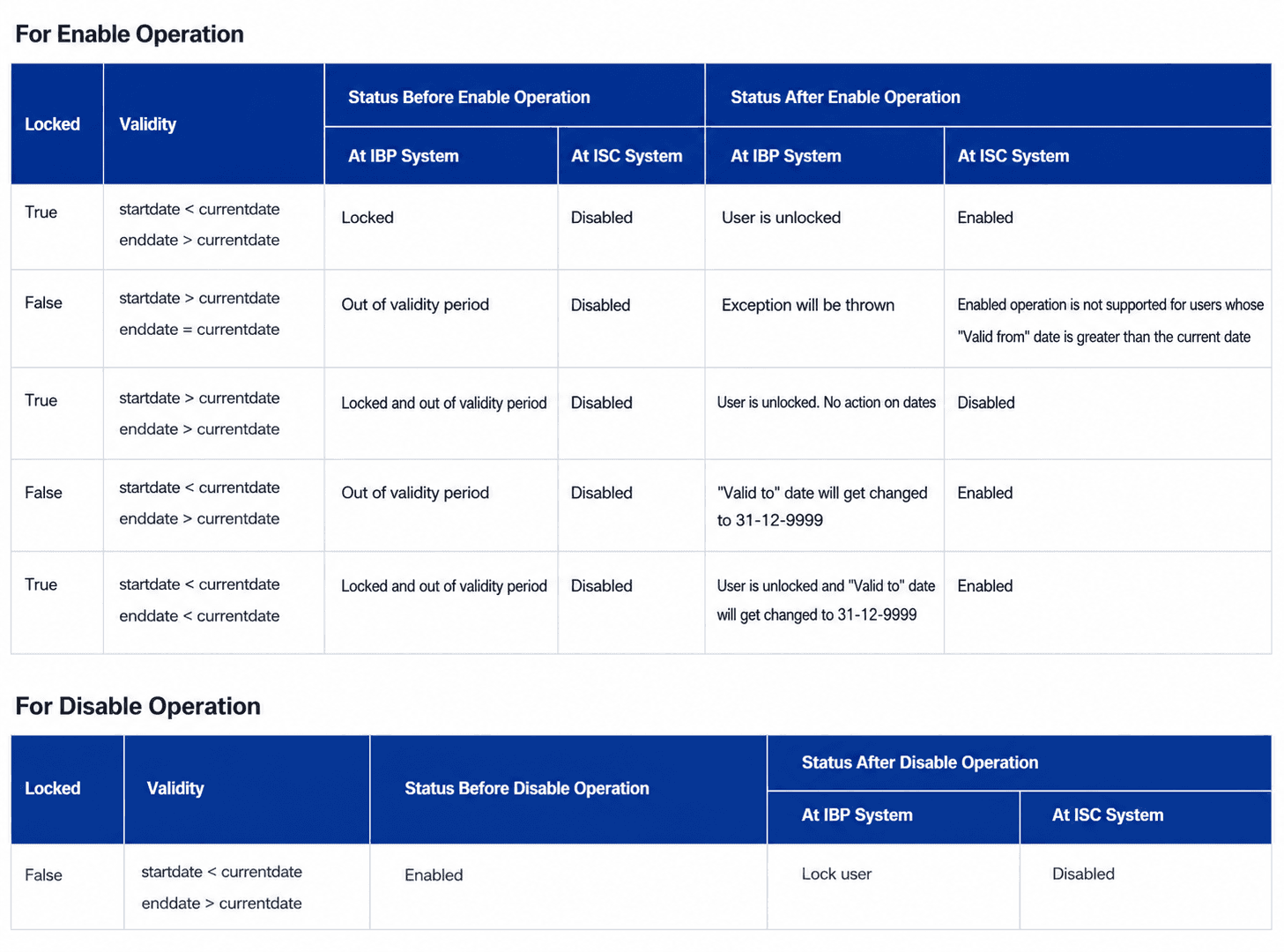
Two tables outlining account statuses before and after Enable and Disable operations in IBP and ISC systems.

Disable will lock the account in SAP : https://documentation.sailpoint.com/connectors/identityiq/sap_ibp_for_supply_chain/help/sap_framework/integrating_sap_ibp_for_supply_chain/enable_disable_operations.html

Update SAP Attributes

After the account is locked, several SAP attributes are updated.

SAP Field

Value

User Group

FLAG4DELETE

End Date

Termination Date

Email

Removed

Account No

ServiceNow Ticket

Method: Direct HTTP operation to SAP (OR) Before Provisioning Rule when Disable operation occurs, plan sets these values to the attributes. Because we can't directly update the account/identity attribute via workflow or API.

5.  Manager Notification

After the account is locked, SailPoint sends an email to the user's manager.

The email informs the manager that the user has been terminated and provides an option to reactivate the account if necessary.

Example message

User has been terminated. If the termination was incorrect, please reactivate the account within 7 days. If no action is taken, the account access will be permanently removed.

A form is included in the email - the manager can choose:  Reactivate or Do Not Reactivate

6.  Grace Period (7 Days)

The system provides a 7-day grace period.

During this time:

  • The account remains locked.

  • Roles and profiles are still assigned.

  • The manager can request reactivation.

This allows recovery if termination was incorrect.

7.  Reactivation Scenario

If the manager requests reactivation within 7 days (from the form), SailPoint performs:

Manage Accounts → Enable

Result:

  • SAP account becomes unlocked.

  • User can log in again.

8.  No Reactivation After 7 Days

If the manager does not respond or chooses not to reactivate, SailPoint performs final cleanup.

The following actions occur:

  • Remove SAP Roles.

  • Remove SAP Profiles.

9.  Overall Workflow
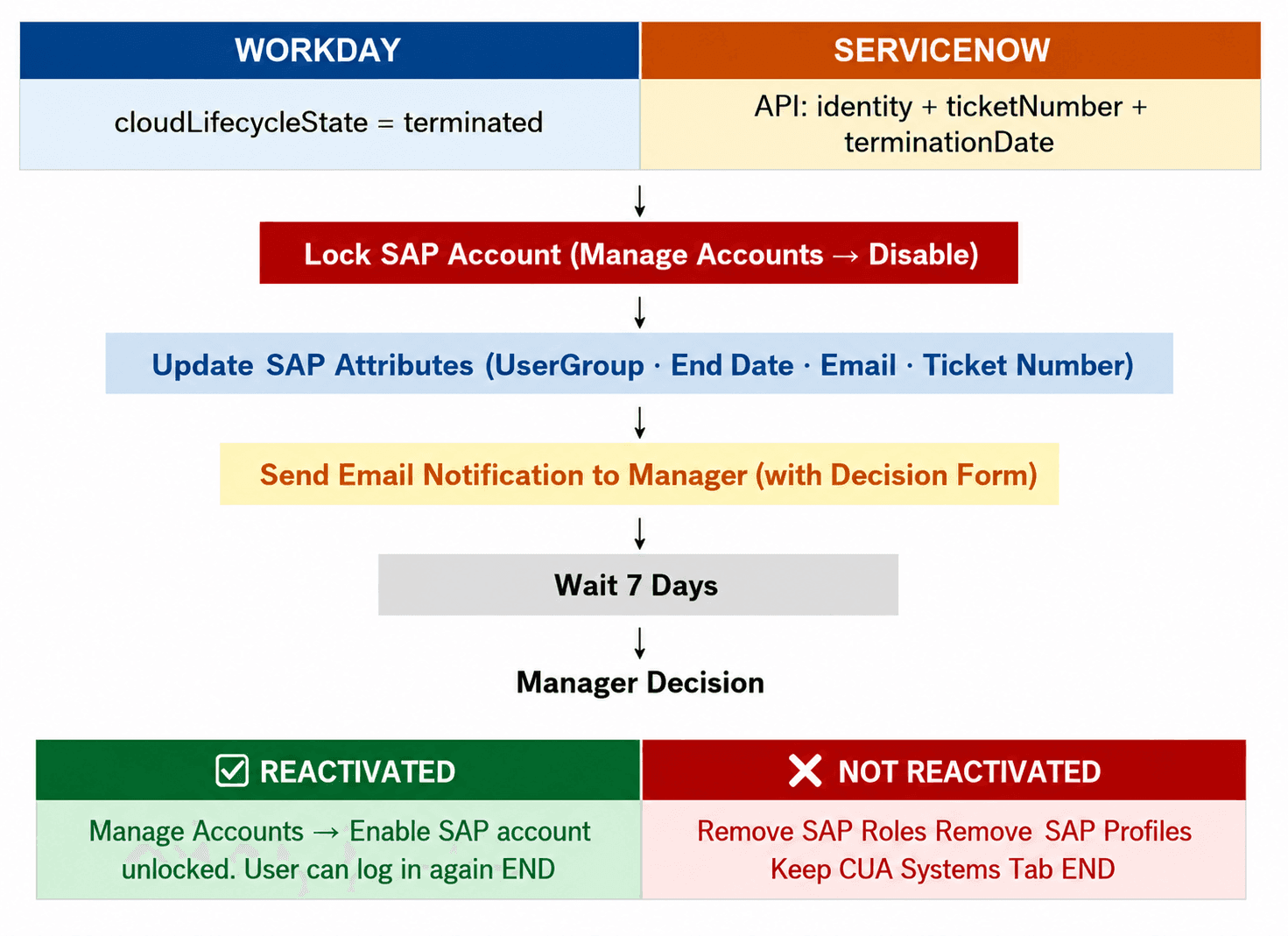
Process diagram detailing the steps and decision branches for SAP-CUA user account deprovisioning.


Stay tuned to our blog to see more posts about

Sailpoint products implementation and its related updates.

Stay tuned to our blog to see more posts about SailPoint products implementation and its related updates.

Category:

Category:

Security

Security

SAP-CUA Deprovisioning Workflow

1.  Purpose

This workflow is to update SAP attributes whenever an account gets locked.

2.  Systems Involved

System

Purpose

SailPoint ISC

Workflow

SAP CUA

Account/HTTP operations

Workday

Enddate / cloudlifecycle state

ServiceNow

Termination requests

3.  Termination Trigger

The workflow can start from two systems.

Workday Trigger

Workday automatically marks the employee as terminated. When SailPoint detects the following change:

cloudLifecycleState = terminated

The deprovisioning workflow starts. In this scenario, there is no ServiceNow ticket number.

ServiceNow Trigger

A termination request can also come from ServiceNow. ServiceNow sends the request to SailPoint through an API call with the following information:

  • Identity ID

  • Ticket Number (e.g. INC0012345)

  • Termination Date

The ticket number is stored in SAP for audit tracking.

4.  Day 0 – Immediate Actions

When termination is detected, SailPoint immediately performs the following actions in SAP.

Lock SAP Account

SailPoint performs:  Manage Accounts → Disable

Result:

  • SAP user account becomes locked.

  • User cannot log in.

Two tables outlining account statuses before and after Enable and Disable operations in IBP and ISC systems.

Disable will lock the account in SAP : https://documentation.sailpoint.com/connectors/identityiq/sap_ibp_for_supply_chain/help/sap_framework/integrating_sap_ibp_for_supply_chain/enable_disable_operations.html

Update SAP Attributes

After the account is locked, several SAP attributes are updated.

SAP Field

Value

User Group

FLAG4DELETE

End Date

Termination Date

Email

Removed

Account No

ServiceNow Ticket

Method: Direct HTTP operation to SAP (OR) Before Provisioning Rule when Disable operation occurs, plan sets these values to the attributes. Because we can't directly update the account/identity attribute via workflow or API.

5.  Manager Notification

After the account is locked, SailPoint sends an email to the user's manager.

The email informs the manager that the user has been terminated and provides an option to reactivate the account if necessary.

Example message

User has been terminated. If the termination was incorrect, please reactivate the account within 7 days. If no action is taken, the account access will be permanently removed.

A form is included in the email - the manager can choose:  Reactivate or Do Not Reactivate

6.  Grace Period (7 Days)

The system provides a 7-day grace period.

During this time:

  • The account remains locked.

  • Roles and profiles are still assigned.

  • The manager can request reactivation.

This allows recovery if termination was incorrect.

7.  Reactivation Scenario

If the manager requests reactivation within 7 days (from the form), SailPoint performs:

Manage Accounts → Enable

Result:

  • SAP account becomes unlocked.

  • User can log in again.

8.  No Reactivation After 7 Days

If the manager does not respond or chooses not to reactivate, SailPoint performs final cleanup.

The following actions occur:

  • Remove SAP Roles.

  • Remove SAP Profiles.

9.  Overall Workflow

Process diagram detailing the steps and decision branches for SAP-CUA user account deprovisioning.


Stay tuned to our blog to see more posts about

Sailpoint products implementation and its related updates.

Category:

Security