
SSL Certificate Creation for Secure API Integration
Date Posted:
3 Mar 2026
Category:
Security
Author:
Valarmathi

SSL Certificate Creation for Secure API Integration
Date Posted:
3 Mar 2026
Category:
Security
Author:
Valarmathi

SSL Certificate Creation for Secure API Integration
Date Posted:
3 Mar 2026
Category:
Security
Author:
Valarmathi
Introduction
SSL certificates for OAuth 2.0 authentication using JWT grant type. Instead of using basic authentication like username and passwords, SailPoint proves its identity to Salesforce using cryptographic keys. The integration is validating JWT signatures. Basically, Salesforce trusts JWT tokens only if they are signed using a private key from a registered certificate.
Here a set of key pair is generating during certificate creation:
• The private key is retained securely by SailPoint.
• The public certificate is uploaded to Salesforce.
The asymmetric encryption model ensures that even if the certificate is exposed to all, the private key remains secure and protected.
When integrating applications like SailPoint Identity Security Cloud and Salesforce, SSL certificates make trust between those systems. Rather than relying on shared static username & passwords, certificate-based authentication ensures that only verified systems can communicate with each other.
Here the integration from the SSL certificate is not used for browser encryption, but used for application-level identity verification. The certificate acts as a digital identity that Salesforce can trust when SailPoint attempts to authenticate using the OAuth 2.0 JWT flow grant type.
Why SSL Certificates Are Required for JWT Authentication
JWT authentication is built by cryptographic trust. Salesforce need to confirm that the JWT it receives from authorized client. This can be done by using an SSL certificate.
The process works as follows:
The process of SailPoint is it signs in the JWT using a private key.
The process of Salesforce it validates the signature using the public key that needs to be embedded in the uploaded SSL certificate
If that signature matches, Salesforce accepts the JWT and provided an access token.
Self-Signed Certificate vs CA-Signed Certificate
Here for integrating SailPoint to Salesforce, a self-signed SSL certificate is used. This approach avoids dependency on external Certificate Authorities but it will still maintain strong security.
Key differences:
Self-signed certificates are creating internally and trusted explicitly by Salesforce
CA-signed certificates are provided by external authorities and used for public-facing services
In Salesforce, it can allow certificates upload directly into the External Client App configuration, here self-signed certificate is sufficient and fully supported by salesforce.
Installing and Preparing OpenSSL
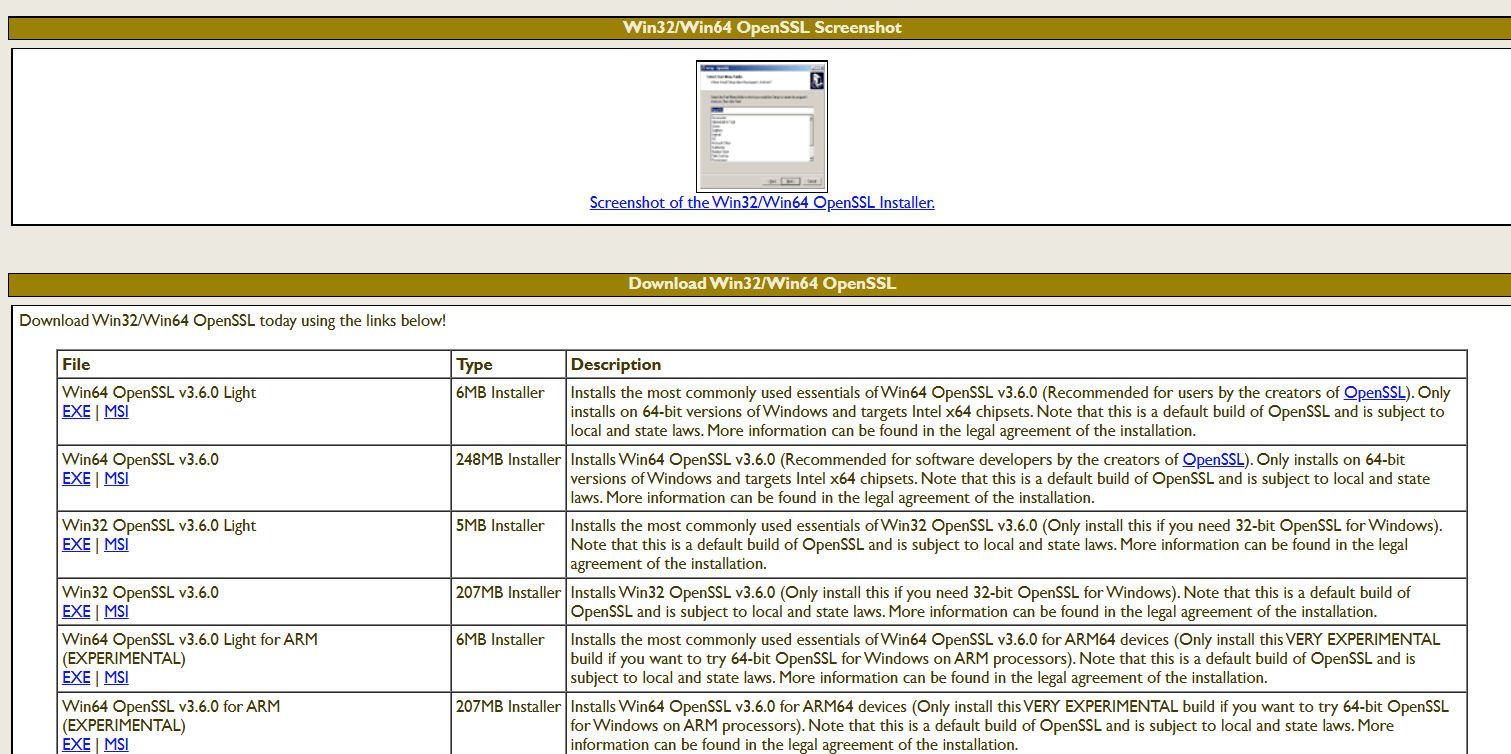
The process of generating private key and certificate, OpenSSL needs to install on to a Windows system.
The Win64 OpenSSL Light distribution needs to select as it provides all cryptographic utilities. After the completion of installation, the OpenSSL binary path it needs to add the system environment variables. We can use the OpenSSL commands it will execute from any command prompt session.
Key Pair Generation
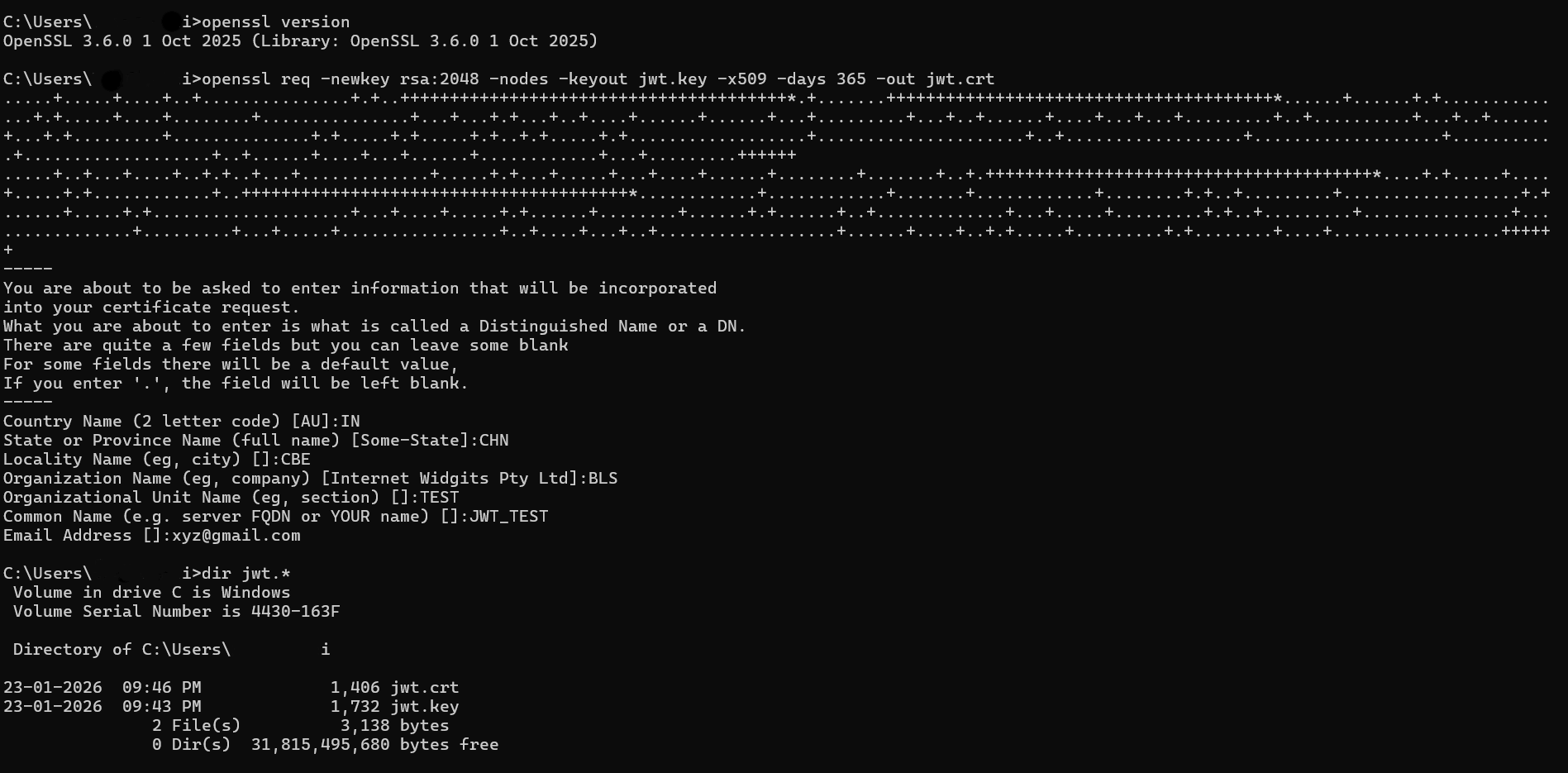
When we generate the SSL certificate, a key pair is created for authentication:
Private Key (jwt.key): it remains securely stored and no need to share
Public Certificate (jwt.crt): uploaded to Salesforce instance
The private key is used for signing in using JWT assertions, but the public certificate allows Salesforce to validate those signatures. Here in case the certificate is exposed, the private key remains protected. For security reason, this is the best for symmetric authentication methods.
Certificate Lifecycle Management Considerations
The SSL certificates we are using for JWT authentication are not permanent. They have an expiration date and it needs to renewed on some period of time.
Best practices:
Tracking certificate expiry dates regularly
Need to renew certificates before expiration
Need to update the certificate in Salesforce without deleting the existing app
Rotating keys securely to avoid downtime
Salesforce App Configuration
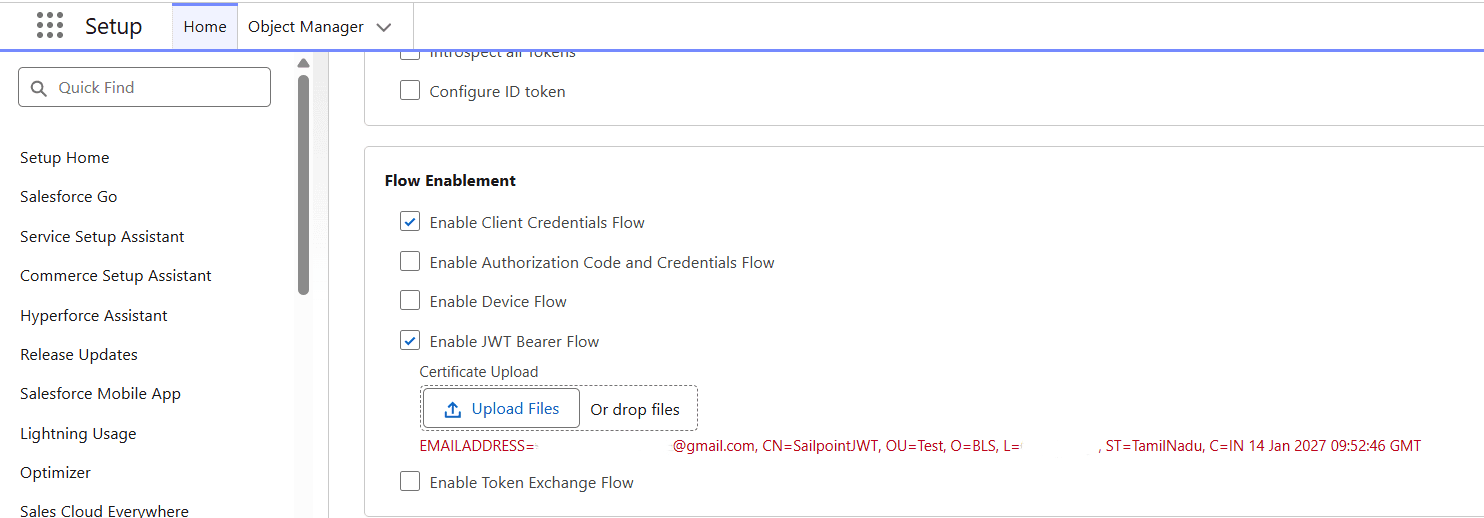
Inside Salesforce Setup configuration, an App is created to support OAuth authentication.
JWT Bearer Flow is explicitly enabled for this application. The SSL certificate generated earlier is uploaded here. This step establishes trust between Salesforce and SailPoint.
SailPoint ISC – OAuth JWT Configuration
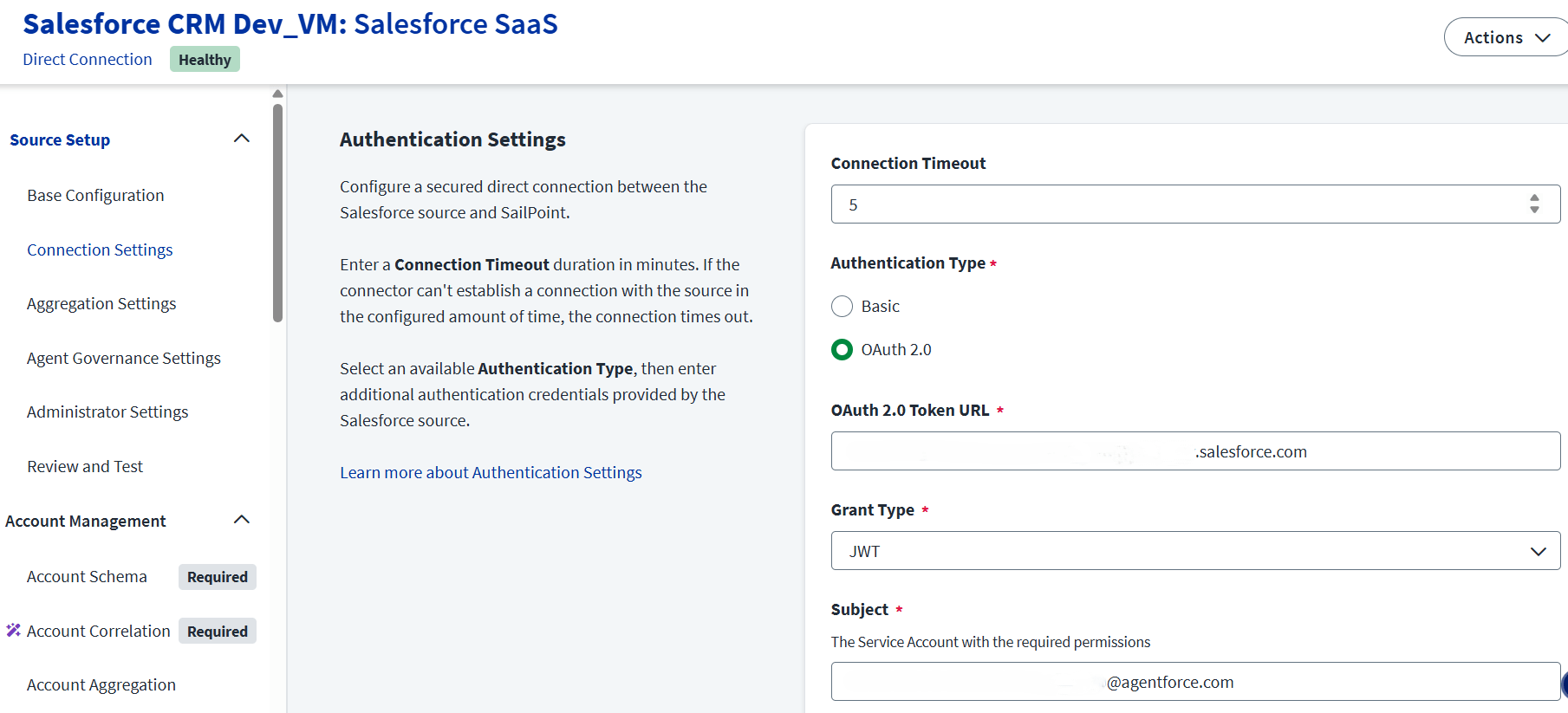
In this Authentication process:
• SailPoint acts as the OAuth client
• Salesforce acts as the authorization server
• Authentication is achieved using a signed JWT instead of user credentials
Each field configured in SailPoint ISC has a specific purpose:
• OAuth Token URL – Salesforce endpoint that accepts JWT assertions
• Grant Type – JWT, indicating certificate-based authentication
• Subject – Salesforce service account username used for API access
• Issuer – OAuth Client ID generated by Salesforce
• Audience – Salesforce login URL that validates the JWT
• Private Key – Used by SailPoint to sign the JWT
• Private Key Password – It protects the private key from unauthorized use
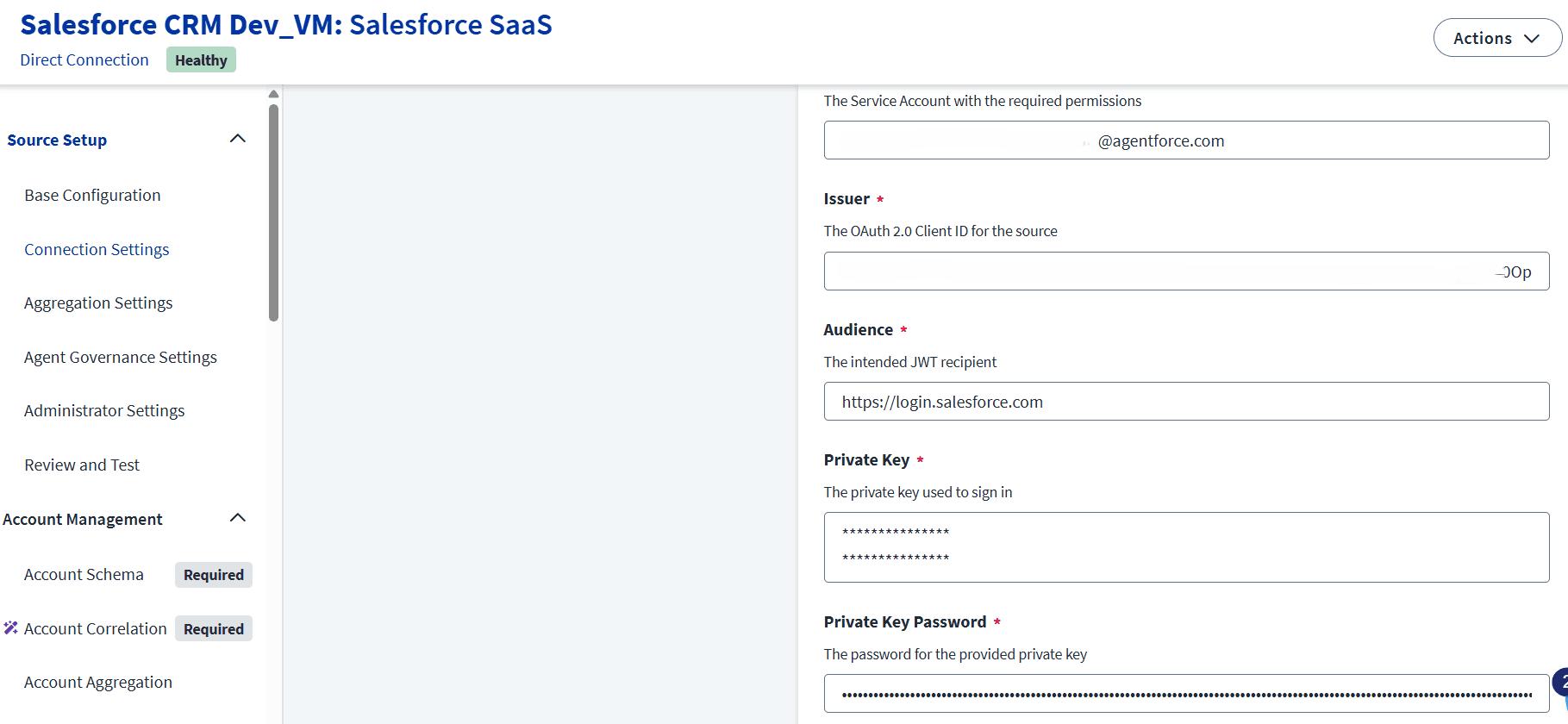
JWT Authentication Flow Execution
During test connection, SailPoint generates a JWT and signs it using the private key.
That signed token is sent to Salesforce for validation. Salesforce verifies that signature using the uploaded certificate for JWT. If validation succeeds, Salesforce issues an OAuth access token for authentication. SailPoint then uses this token to perform account aggregation and provisioning operations.
Conclusion
In this integration process, SSL certificate creation and OAuth 2.0 JWT authentication provides a password less security model. This approach is recommended for SailPoint Salesforce integrations where automation, security, and scalability are critical. A clear understanding of each configuration element helps administrators troubleshoot issues and design reliable identity governance solutions.
Stay tuned to our blog to see more posts about
Sailpoint products implementation and its related updates.
Stay tuned to our blog to see more posts about
Sailpoint products implementation and its related updates.
Category:
Security
Stay tuned to our blog to see more posts about
Sailpoint products implementation and its related updates.
Stay tuned to our blog to see more posts about
Sailpoint products implementation and its related updates.
Category:
Category:
Security
Security
Get your
Tailored Quote for your
Organisation
Get your
Tailored Quote for your
Organisation
Introduction
SSL certificates for OAuth 2.0 authentication using JWT grant type. Instead of using basic authentication like username and passwords, SailPoint proves its identity to Salesforce using cryptographic keys. The integration is validating JWT signatures. Basically, Salesforce trusts JWT tokens only if they are signed using a private key from a registered certificate.
Here a set of key pair is generating during certificate creation:
• The private key is retained securely by SailPoint.
• The public certificate is uploaded to Salesforce.
The asymmetric encryption model ensures that even if the certificate is exposed to all, the private key remains secure and protected.
When integrating applications like SailPoint Identity Security Cloud and Salesforce, SSL certificates make trust between those systems. Rather than relying on shared static username & passwords, certificate-based authentication ensures that only verified systems can communicate with each other.
Here the integration from the SSL certificate is not used for browser encryption, but used for application-level identity verification. The certificate acts as a digital identity that Salesforce can trust when SailPoint attempts to authenticate using the OAuth 2.0 JWT flow grant type.
Why SSL Certificates Are Required for JWT Authentication
JWT authentication is built by cryptographic trust. Salesforce need to confirm that the JWT it receives from authorized client. This can be done by using an SSL certificate.
The process works as follows:
The process of SailPoint is it signs in the JWT using a private key.
The process of Salesforce it validates the signature using the public key that needs to be embedded in the uploaded SSL certificate
If that signature matches, Salesforce accepts the JWT and provided an access token.
Self-Signed Certificate vs CA-Signed Certificate
Here for integrating SailPoint to Salesforce, a self-signed SSL certificate is used. This approach avoids dependency on external Certificate Authorities but it will still maintain strong security.
Key differences:
Self-signed certificates are creating internally and trusted explicitly by Salesforce
CA-signed certificates are provided by external authorities and used for public-facing services
In Salesforce, it can allow certificates upload directly into the External Client App configuration, here self-signed certificate is sufficient and fully supported by salesforce.
Installing and Preparing OpenSSL
The process of generating private key and certificate, OpenSSL needs to install on to a Windows system.
The Win64 OpenSSL Light distribution needs to select as it provides all cryptographic utilities. After the completion of installation, the OpenSSL binary path it needs to add the system environment variables. We can use the OpenSSL commands it will execute from any command prompt session.

Key Pair Generation
When we generate the SSL certificate, a key pair is created for authentication:
Private Key (jwt.key): it remains securely stored and no need to share
Public Certificate (jwt.crt): uploaded to Salesforce instance
The private key is used for signing in using JWT assertions, but the public certificate allows Salesforce to validate those signatures. Here in case the certificate is exposed, the private key remains protected. For security reason, this is the best for symmetric authentication methods.

Certificate Lifecycle Management Considerations
The SSL certificates we are using for JWT authentication are not permanent. They have an expiration date and it needs to renewed on some period of time.
Best practices:
Tracking certificate expiry dates regularly
Need to renew certificates before expiration
Need to update the certificate in Salesforce without deleting the existing app
Rotating keys securely to avoid downtime
Salesforce App Configuration
Inside Salesforce Setup configuration, an App is created to support OAuth authentication.
JWT Bearer Flow is explicitly enabled for this application. The SSL certificate generated earlier is uploaded here. This step establishes trust between Salesforce and SailPoint.

SailPoint ISC – OAuth JWT Configuration
In this Authentication process:
• SailPoint acts as the OAuth client
• Salesforce acts as the authorization server
• Authentication is achieved using a signed JWT instead of user credentials
Each field configured in SailPoint ISC has a specific purpose:
• OAuth Token URL – Salesforce endpoint that accepts JWT assertions
• Grant Type – JWT, indicating certificate-based authentication
• Subject – Salesforce service account username used for API access
• Issuer – OAuth Client ID generated by Salesforce
• Audience – Salesforce login URL that validates the JWT
• Private Key – Used by SailPoint to sign the JWT
• Private Key Password – It protects the private key from unauthorized use


JWT Authentication Flow Execution
During test connection, SailPoint generates a JWT and signs it using the private key.
That signed token is sent to Salesforce for validation. Salesforce verifies that signature using the uploaded certificate for JWT. If validation succeeds, Salesforce issues an OAuth access token for authentication. SailPoint then uses this token to perform account aggregation and provisioning operations.
Conclusion
In this integration process, SSL certificate creation and OAuth 2.0 JWT authentication provides a password less security model. This approach is recommended for SailPoint Salesforce integrations where automation, security, and scalability are critical. A clear understanding of each configuration element helps administrators troubleshoot issues and design reliable identity governance solutions.
