
Dark Violet banner with laptop, shield, lock, and checklist icons connected by network lines, representing identity and access management.

SailPoint + ServiceNow Access Integration

Date Posted:

26 Feb 2026

Category:

Security

Author:

Gopi

Dark Violet banner with laptop, shield, lock, and checklist icons connected by network lines, representing identity and access management.

SailPoint + ServiceNow Access Integration

Date Posted:

26 Feb 2026

Category:

Security

Author:

Gopi

Dark Violet banner with laptop, shield, lock, and checklist icons connected by network lines, representing identity and access management.

SailPoint + ServiceNow Access Integration

Date Posted:

26 Feb 2026

Category:

Security

Author:

Gopi

SailPoint + ServiceNow: Making Access Requests Feel Simple Again

Here is something almost everyone deals with at work. You need access to an application. Maybe you just got hired. Maybe you switched teams or maybe you just need a new tool to get your job done. You put in a request. Then you wait. And wait. You send a follow-up email. You ping someone on chat. They tell you to check with someone else. That person is out until Monday. Days go by. You still cannot do your work.

Now here is the thing. The people on the other side are not trying to ignore you. They are buried. They have hundreds of requests to process. They have to check every one against company rules. They have to make sure the right managers approve. They have to keep records for auditors. And the tools they use do not always work well together. So, requests get stuck. Emails get lost. Everyone gets frustrated.

The good news is it does not have to work this way. There is a better approach. Instead of making people jump between different systems, everything can come together in one place. Employees already use ServiceNow for IT help. That is where they request laptops and software and password resets. So why not let them request access there too? That is exactly what the SailPoint apps for ServiceNow do. They connect the two systems so everything works together. Employees stay in ServiceNow. SailPoint handles all the governance stuff behind the scenes. No extra logins. No chasing down approvals. Just a clean process that actually works.

One Integration, Three Ways It Helps

The SailPoint applications are available right in the ServiceNow Store. You can use them either separately or together depending on what your team actually needs. In practice, they help with three main things.

Keeping Identity Data in Sync

Let me tell you about a problem that does not get talked about enough. When your user data is messy, everything else gets messy too. If SailPoint thinks someone is in the sales department but ServiceNow shows them as marketing, approvals go to the wrong manager. Access reviews become confusing. Auditors start asking questions you do not want to answer.

Syncing identity data between the two systems fixes this. User information stays the same in both places. Names match. Departments match. Managers match. Everything lines up. This might sound like boring backend work. But it makes a huge difference when you are trying to run clean access reviews or prove things to an auditor. No more guessing. No more mismatches. Just clean data that everyone can trust. Whether you use a Virtual Appliance or the SaaS connector, the setup handles this automatically. You set it up once and it just runs.

Handling Manual Access Through the Service Desk

Here is another reality check. Not every application plays nice with automation. Most companies have at least a few old systems. Maybe it is a custom database from ten years ago. Maybe it is some legacy tool that nobody wants to touch. These systems cannot automatically grant access. Someone has to do it by hand.

In the past, these requests turned into email chains. Someone would write "Hey can you add me to this thing?" Then someone else would forward it. Maybe it got done. Maybe it did not. Hard to say. The SailPoint integration changes that. When someone requests access to one of these old systems, SailPoint creates a ticket in ServiceNow automatically. The service desk gets it in their normal queue. They do the manual work if they have to. But everything is tracked. Approvals are still enforced. Nothing falls through the cracks. The process stays clean and auditable even when the work is manual. That is a big win for teams that have been dealing with email chaos for years.

Self-Service Access That Employees Actually Use

This is where most teams see the biggest improvement. Think about how self-service usually works. Someone builds a catalog. They add a bunch of items. Then they wait for people to use it. Sometimes they do. Sometimes they do not.

With this integration, employees request access the same way they request anything else. They go to the ServiceNow portal they already use every day. They find what they need in the catalog. They click submit. Done. From their perspective, it is just another service request. No separate tool to learn. No new login to remember. No confusion about where to go.

Behind the scenes, SailPoint handles all the heavy lifting. It checks for policy violations automatically. It sends approvals to the right managers. It provisions access once everything is approved. And status updates flow back to ServiceNow so employees never have to ask "Where is my request?" The process feels simple because it is simple. Employees get what they need faster. IT spends less time answering status questions. Everyone moves on with their day.
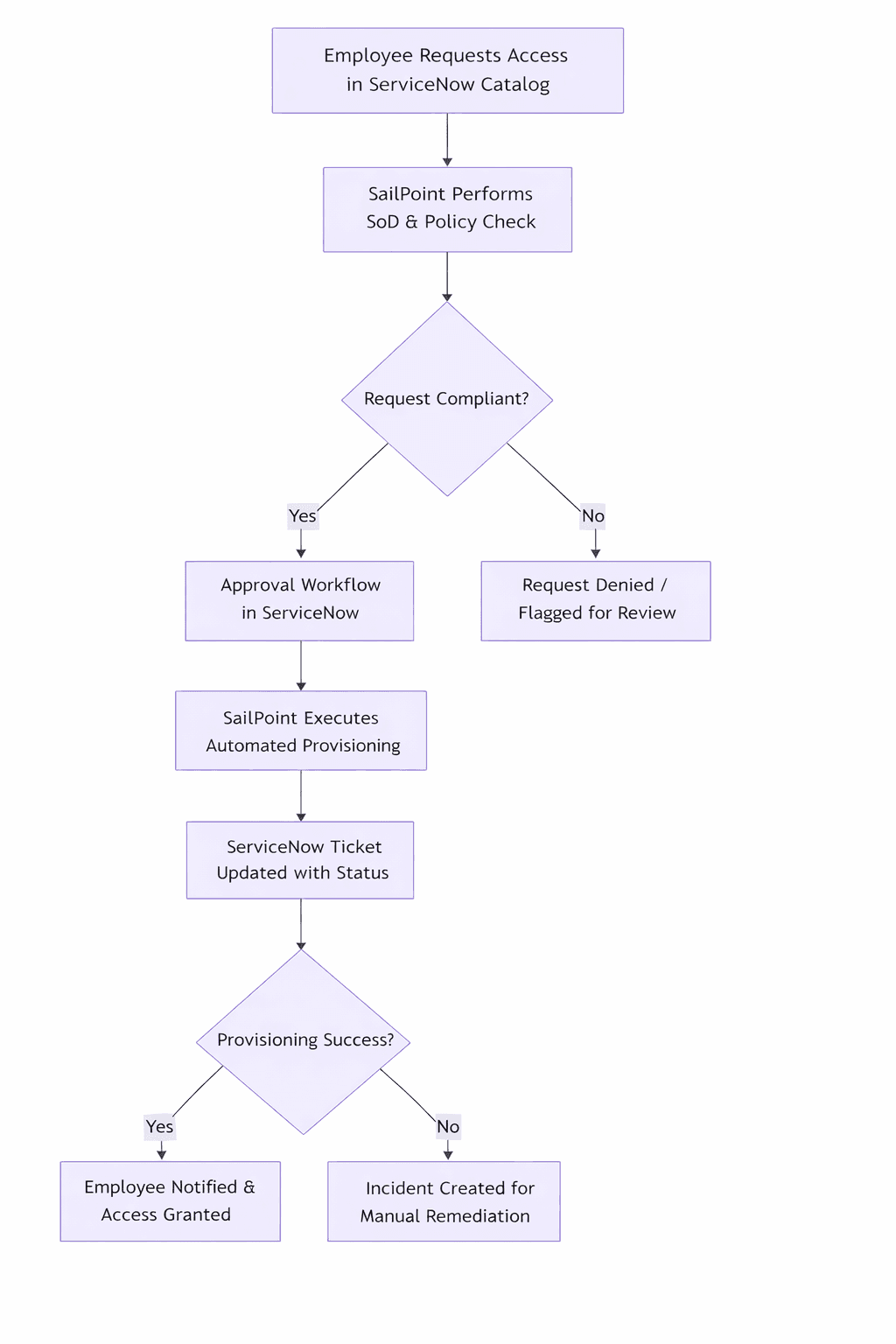
Flowchart illustrating the integration process between ServiceNow and SailPoint for employee access requests, automated provisioning, and remediation.

Why Teams Care About This Integration

Let me break down why these matters to different people. For employees, it is pretty straightforward. They use one system. They get faster results. They do not have to chase anyone down. That alone cuts down on frustration and saves time.

For IT and identity teams, the benefits run deeper. Every request gets checked against governance rules automatically. Approvals happen the way they are supposed to. Audit trails are clean and complete. When auditors come knocking, everything is right there waiting for them. The integration also cuts down on manual work. Automated approvals and status updates mean less time spent on administrative stuff. Teams can focus on real problems instead of cleaning up messes or answering where is my request emails.

Another thing worth mentioning is flexibility. You do not have to do everything at once. Some teams start with self-service access because that is where they feel the most pain. Others start with identity synchronization because their data is a mess. You can pick one piece, get it working, and add more over time as your identity program grows.

How to Get Started

The best place to begin is by asking one simple question. What problem is bothering us the most right now? Maybe your identity data is inconsistent and causing approval errors. Start with synchronization. Maybe your employees are constantly complaining about slow access. Start with self-service. Maybe your service desk is drowning in manual tickets. Start there.

Once you know what you want to fix first, head to the ServiceNow Store. The official SailPoint applications are right there. They are certified and ready to use. You do not need to build anything from scratch or maintain heavy customizations. SailPoint also provides clear documentation for each integration path. It covers configuration, workflows, approvals, and notifications. You can move from planning to actual value pretty quickly without getting stuck in complicated setup work.

Final Thoughts

Here is the bottom line. Connecting identity governance with IT service management is not just a nice to have anymore. It is how organizations scale without breaking things. It is how you keep employees moving fast while still keeping the company secure.

SailPoint ServiceNow applications give you a practical way to make that happen. They bring governance into everyday workflows. They meet employees where they already work. They give IT teams better control behind the scenes. Access requests do not have to be painful. They can be simple. They can be fast. They can work the way everyone expects them to work.

Next step is easy. Go check out the official SailPoint applications in the ServiceNow Store. Look through the integration guides. See which capability fits what your team needs right now. Then take it from there.


Stay tuned to our blog to see more posts about

Sailpoint products implementation and its related updates.

Stay tuned to our blog to see more posts about

Sailpoint products implementation and its related updates.

Category:

Security

Stay tuned to our blog to see more posts about

Sailpoint products implementation and its related updates.

Stay tuned to our blog to see more posts about

Sailpoint products implementation and its related updates.

Category:

Category:

Security

Security

Get your

Tailored Quote for your

Organisation

Get your

Tailored Quote for your

Organisation

SailPoint + ServiceNow: Making Access Requests Feel Simple Again

Here is something almost everyone deals with at work. You need access to an application. Maybe you just got hired. Maybe you switched teams or maybe you just need a new tool to get your job done. You put in a request. Then you wait. And wait. You send a follow-up email. You ping someone on chat. They tell you to check with someone else. That person is out until Monday. Days go by. You still cannot do your work.

Now here is the thing. The people on the other side are not trying to ignore you. They are buried. They have hundreds of requests to process. They have to check every one against company rules. They have to make sure the right managers approve. They have to keep records for auditors. And the tools they use do not always work well together. So, requests get stuck. Emails get lost. Everyone gets frustrated.

The good news is it does not have to work this way. There is a better approach. Instead of making people jump between different systems, everything can come together in one place. Employees already use ServiceNow for IT help. That is where they request laptops and software and password resets. So why not let them request access there too? That is exactly what the SailPoint apps for ServiceNow do. They connect the two systems so everything works together. Employees stay in ServiceNow. SailPoint handles all the governance stuff behind the scenes. No extra logins. No chasing down approvals. Just a clean process that actually works.

One Integration, Three Ways It Helps

The SailPoint applications are available right in the ServiceNow Store. You can use them either separately or together depending on what your team actually needs. In practice, they help with three main things.

Keeping Identity Data in Sync

Let me tell you about a problem that does not get talked about enough. When your user data is messy, everything else gets messy too. If SailPoint thinks someone is in the sales department but ServiceNow shows them as marketing, approvals go to the wrong manager. Access reviews become confusing. Auditors start asking questions you do not want to answer.

Syncing identity data between the two systems fixes this. User information stays the same in both places. Names match. Departments match. Managers match. Everything lines up. This might sound like boring backend work. But it makes a huge difference when you are trying to run clean access reviews or prove things to an auditor. No more guessing. No more mismatches. Just clean data that everyone can trust. Whether you use a Virtual Appliance or the SaaS connector, the setup handles this automatically. You set it up once and it just runs.

Handling Manual Access Through the Service Desk

Here is another reality check. Not every application plays nice with automation. Most companies have at least a few old systems. Maybe it is a custom database from ten years ago. Maybe it is some legacy tool that nobody wants to touch. These systems cannot automatically grant access. Someone has to do it by hand.

In the past, these requests turned into email chains. Someone would write "Hey can you add me to this thing?" Then someone else would forward it. Maybe it got done. Maybe it did not. Hard to say. The SailPoint integration changes that. When someone requests access to one of these old systems, SailPoint creates a ticket in ServiceNow automatically. The service desk gets it in their normal queue. They do the manual work if they have to. But everything is tracked. Approvals are still enforced. Nothing falls through the cracks. The process stays clean and auditable even when the work is manual. That is a big win for teams that have been dealing with email chaos for years.

Self-Service Access That Employees Actually Use

This is where most teams see the biggest improvement. Think about how self-service usually works. Someone builds a catalog. They add a bunch of items. Then they wait for people to use it. Sometimes they do. Sometimes they do not.

With this integration, employees request access the same way they request anything else. They go to the ServiceNow portal they already use every day. They find what they need in the catalog. They click submit. Done. From their perspective, it is just another service request. No separate tool to learn. No new login to remember. No confusion about where to go.

Behind the scenes, SailPoint handles all the heavy lifting. It checks for policy violations automatically. It sends approvals to the right managers. It provisions access once everything is approved. And status updates flow back to ServiceNow so employees never have to ask "Where is my request?" The process feels simple because it is simple. Employees get what they need faster. IT spends less time answering status questions. Everyone moves on with their day.

Flowchart illustrating the integration process between ServiceNow and SailPoint for employee access requests, automated provisioning, and remediation.

Why Teams Care About This Integration

Let me break down why these matters to different people. For employees, it is pretty straightforward. They use one system. They get faster results. They do not have to chase anyone down. That alone cuts down on frustration and saves time.

For IT and identity teams, the benefits run deeper. Every request gets checked against governance rules automatically. Approvals happen the way they are supposed to. Audit trails are clean and complete. When auditors come knocking, everything is right there waiting for them. The integration also cuts down on manual work. Automated approvals and status updates mean less time spent on administrative stuff. Teams can focus on real problems instead of cleaning up messes or answering where is my request emails.

Another thing worth mentioning is flexibility. You do not have to do everything at once. Some teams start with self-service access because that is where they feel the most pain. Others start with identity synchronization because their data is a mess. You can pick one piece, get it working, and add more over time as your identity program grows.

How to Get Started

The best place to begin is by asking one simple question. What problem is bothering us the most right now? Maybe your identity data is inconsistent and causing approval errors. Start with synchronization. Maybe your employees are constantly complaining about slow access. Start with self-service. Maybe your service desk is drowning in manual tickets. Start there.

Once you know what you want to fix first, head to the ServiceNow Store. The official SailPoint applications are right there. They are certified and ready to use. You do not need to build anything from scratch or maintain heavy customizations. SailPoint also provides clear documentation for each integration path. It covers configuration, workflows, approvals, and notifications. You can move from planning to actual value pretty quickly without getting stuck in complicated setup work.

Final Thoughts

Here is the bottom line. Connecting identity governance with IT service management is not just a nice to have anymore. It is how organizations scale without breaking things. It is how you keep employees moving fast while still keeping the company secure.

SailPoint ServiceNow applications give you a practical way to make that happen. They bring governance into everyday workflows. They meet employees where they already work. They give IT teams better control behind the scenes. Access requests do not have to be painful. They can be simple. They can be fast. They can work the way everyone expects them to work.

Next step is easy. Go check out the official SailPoint applications in the ServiceNow Store. Look through the integration guides. See which capability fits what your team needs right now. Then take it from there.