Secure credential management with cloud and server icons.

SailPoint ISC Credential Providers: Configuration Guide

Date Posted:

Category:

Security

Author:

Dhanushri

Secure credential management with cloud and server icons.

SailPoint ISC Credential Providers: Configuration Guide

Date Posted:

Category:

Security

Author:

Dhanushri

Secure credential management with cloud and server icons.

SailPoint ISC Credential Providers: Configuration Guide

Date Posted:

Category:

Security

Author:

Dhanushri

Listen Instead of Reading

Listen Instead of Reading

04:17 Min
00:00-04:17

Credential Provider

Introduction

Credential Provider aids for the credential rotation process which prevents the static storage of passwords in ISC.

SailPoint ISC currently supports 10 credential Providers to fetch and rotate the passwords for the source connections.

The credential providers in ISC

  1. AWS Secrets Manager.

  2. Azure Key Vault.

  3. BeyondTrust Password Safe Cloud (Secrets Manager).

  4. BeyondTrustPassword Safe On-Premise (Secrets Manager).

  5. CyberArk Central Credential Provider.

  6. CyberArk Conjur Cloud.

  7. Delinea Secret Server (Cloud) - Secrets Manager.

  8. Delinea Secret Server (On-Premise) - Secrets Manager.

  9. HashiCorp Vault (On-Premise).

  10. HashiCorp Vault (Cloud).

Functionality of Credential Providers

All these credential Providers provides the credential cycling functionality to authenticate into ISC. It fetches the recently refreshed credentials for the connectors to transact with source for the secure connection with ISC.

Prerequisites

The credential providers for VA-based Deep Governance connectors, the source and credential provider virtual appliance must be in the same VA Cluster. Now the VA-based Deep Governance connectors, SaaS-based Discovery connectors and Quick Compliance connectors now support the use of credential providers.

Service accounts must have the right permissions to support the credential provider.

CyberArk Central Credential Provider

One of the components in CyberArk which is a cybersecurity platform mainly used for privileged access management.

With the CCP,

  1. The credentials are stored in CyberArk Vault.

  2. ISC connects with the CyberArk CCP.

  3. Fetches the recent password using,

    • AppID

    • Safe

    • Object name/credential path

    • CCP URL

Requirements for CyberArk Credential Providers

  1. Host URL.

  2. Certificate File Name.

  3. Certificate Password.

  4. PFX file:2(for certificate serial Number Authentication). Contains Certificate along with the private keys used for security purpose.

  5. Whenever the source uses the credential provider, we have to mention the credential path,(where the password is stored) wherever we use the password.

  6. Path syntax-Path syntax - {params required to fetch secret}/{secretKey}

  7. Secret URL - secrets://{CyberArk Central Credential Provider Source Name}/{params required to fetch secret}/{secretKey}

Adding a New Credential Provider in SailPoint

  1. Sign in to SailPoint.

  2. Admin > Connections > Credential providers.

  3. Select create new.

  4. Select the credential providers type and select configure.

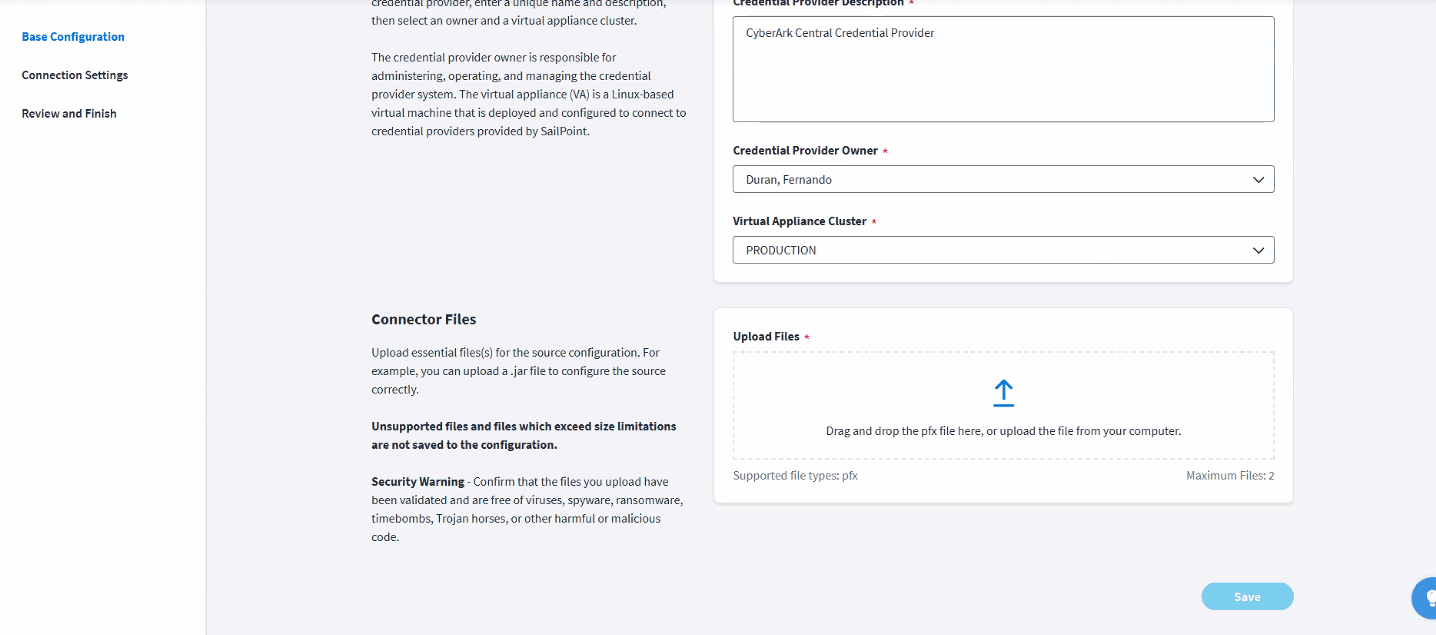
In base configuration

  1. Enter the details:

    • Enter a Credential Provider Name.

    • Enter a Credential Provider Description.

    • Select a Credential Provider Owner.

    • Select a virtual appliance cluster.

  2. Upload the pfx file.

  3. Select save.

Credential provider configuration page with file upload section for PFX certificates.

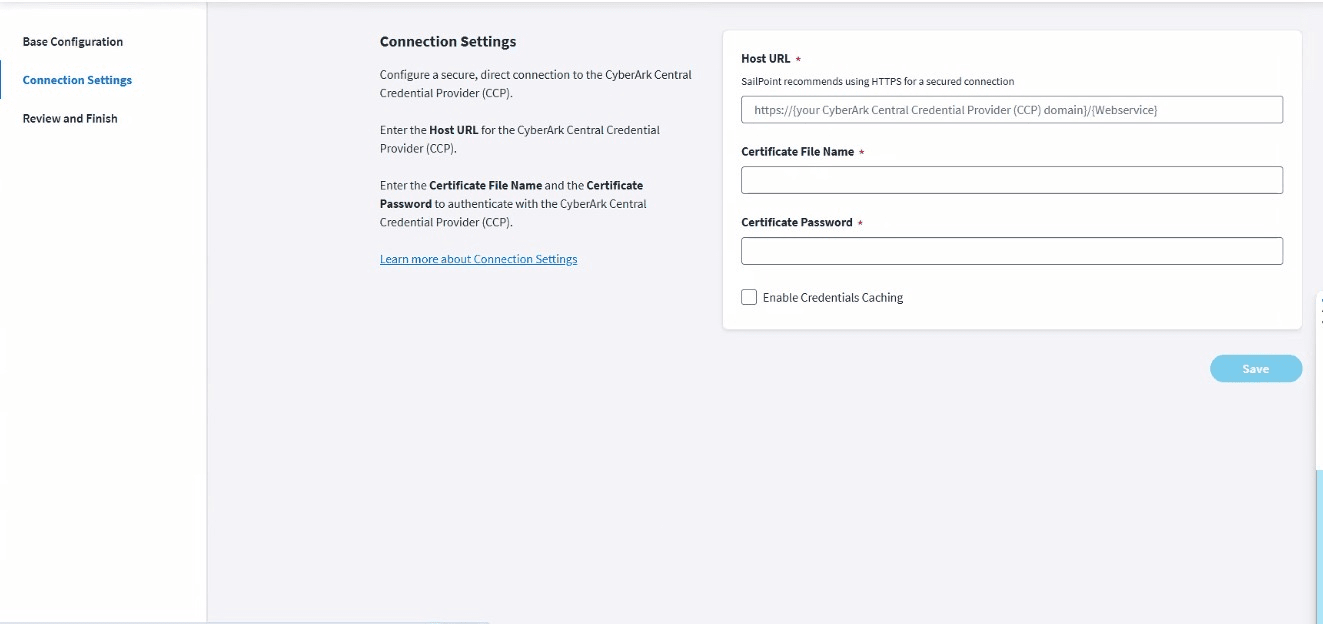
In Connection Settings

  1. Enter the HostURL.

  2. Enter the Certificate File Name and Certificate Password to authenticate.

  3. Enable Credential caching.

  4. Select Save.

Connection settings page for configuring the CyberArk Central Credential Provider.**  Send the next image if you'd like me to create its alt text too.

Configuring a Source to Use a Credential Provider

After the creation of a credential provider, you can configure the source to use the CCP.

In the Source Base Configuration tab, Select Use a Credential Provider.

Select every secret field in the configuration pages which can use the CCP, and provide the credential path.

Active Directory Source Configuration with CCP

  1. In Base Configuration: Select Use a Credential Provider
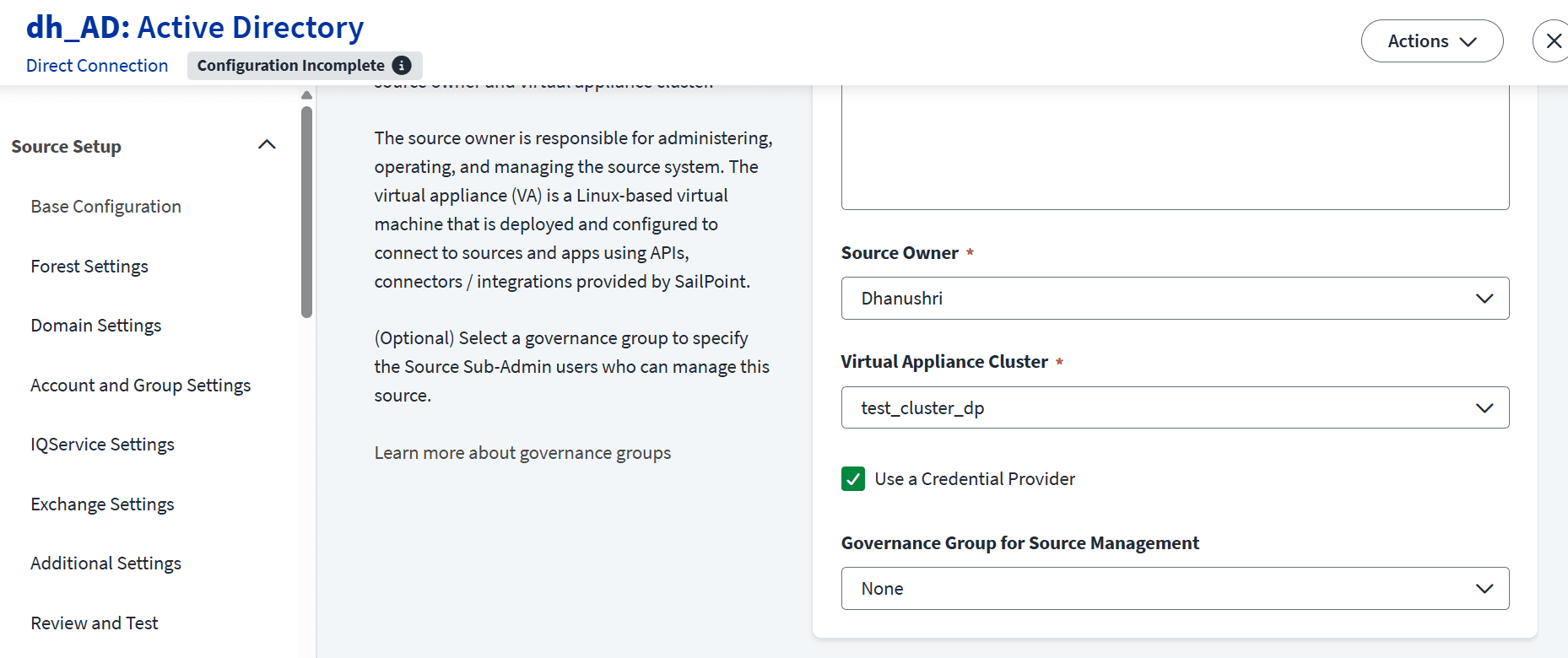
Active Directory source configuration with the credential provider enabled.
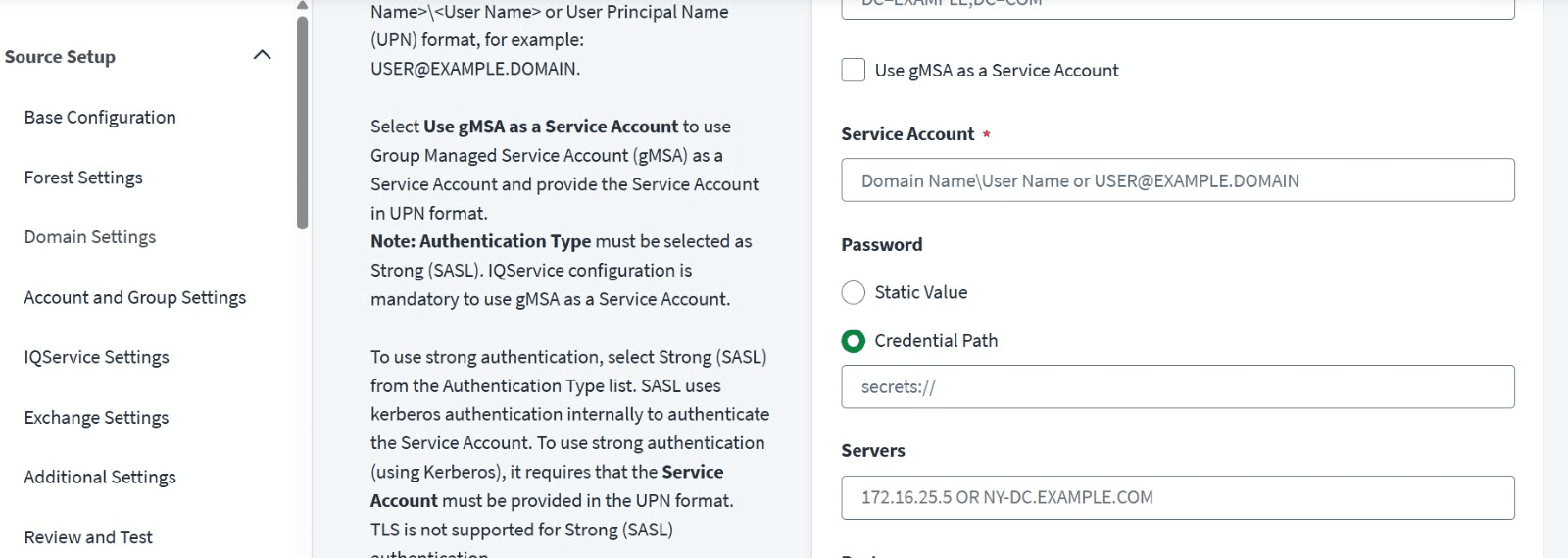
  1. In Forest Setting

Credential path configuration for the Active Directory service account password.

Likewise in Domain, Exchange, IQ Service, Additional Settings mention the credential path.

Conclusion

In CCP can also save the credentials in cache. But it needs to be refreshed.

Thus Credential Cycling functionality of CCP in ISC  is used to fetch the recent passwords in a more secure way.


Stay tuned to our blog to see more posts about

Sailpoint products implementation and its related updates.

Stay tuned to our blog to see more posts about SailPoint products implementation and its related updates.

Category:

Category:

Security

Security

For more detail or questions

For more detail or questions

Listen Instead of Reading
04:17 Min
00:00-04:17

Credential Provider

Introduction

Credential Provider aids for the credential rotation process which prevents the static storage of passwords in ISC.

SailPoint ISC currently supports 10 credential Providers to fetch and rotate the passwords for the source connections.

The credential providers in ISC

  1. AWS Secrets Manager.

  2. Azure Key Vault.

  3. BeyondTrust Password Safe Cloud (Secrets Manager).

  4. BeyondTrustPassword Safe On-Premise (Secrets Manager).

  5. CyberArk Central Credential Provider.

  6. CyberArk Conjur Cloud.

  7. Delinea Secret Server (Cloud) - Secrets Manager.

  8. Delinea Secret Server (On-Premise) - Secrets Manager.

  9. HashiCorp Vault (On-Premise).

  10. HashiCorp Vault (Cloud).

Functionality of Credential Providers

All these credential Providers provides the credential cycling functionality to authenticate into ISC. It fetches the recently refreshed credentials for the connectors to transact with source for the secure connection with ISC.

Prerequisites

The credential providers for VA-based Deep Governance connectors, the source and credential provider virtual appliance must be in the same VA Cluster. Now the VA-based Deep Governance connectors, SaaS-based Discovery connectors and Quick Compliance connectors now support the use of credential providers.

Service accounts must have the right permissions to support the credential provider.

CyberArk Central Credential Provider

One of the components in CyberArk which is a cybersecurity platform mainly used for privileged access management.

With the CCP,

  1. The credentials are stored in CyberArk Vault.

  2. ISC connects with the CyberArk CCP.

  3. Fetches the recent password using,

    • AppID

    • Safe

    • Object name/credential path

    • CCP URL

Requirements for CyberArk Credential Providers

  1. Host URL.

  2. Certificate File Name.

  3. Certificate Password.

  4. PFX file:2(for certificate serial Number Authentication). Contains Certificate along with the private keys used for security purpose.

  5. Whenever the source uses the credential provider, we have to mention the credential path,(where the password is stored) wherever we use the password.

  6. Path syntax-Path syntax - {params required to fetch secret}/{secretKey}

  7. Secret URL - secrets://{CyberArk Central Credential Provider Source Name}/{params required to fetch secret}/{secretKey}

Adding a New Credential Provider in SailPoint

  1. Sign in to SailPoint.

  2. Admin > Connections > Credential providers.

  3. Select create new.

  4. Select the credential providers type and select configure.

In base configuration

  1. Enter the details:

    • Enter a Credential Provider Name.

    • Enter a Credential Provider Description.

    • Select a Credential Provider Owner.

    • Select a virtual appliance cluster.

  2. Upload the pfx file.

  3. Select save.

Credential provider configuration page with file upload section for PFX certificates.

In Connection Settings

  1. Enter the HostURL.

  2. Enter the Certificate File Name and Certificate Password to authenticate.

  3. Enable Credential caching.

  4. Select Save.

Connection settings page for configuring the CyberArk Central Credential Provider.**  Send the next image if you'd like me to create its alt text too.

Configuring a Source to Use a Credential Provider

After the creation of a credential provider, you can configure the source to use the CCP.

In the Source Base Configuration tab, Select Use a Credential Provider.

Select every secret field in the configuration pages which can use the CCP, and provide the credential path.

Active Directory Source Configuration with CCP

  1. In Base Configuration: Select Use a Credential Provider

Active Directory source configuration with the credential provider enabled.
  1. In Forest Setting

Credential path configuration for the Active Directory service account password.

Likewise in Domain, Exchange, IQ Service, Additional Settings mention the credential path.

Conclusion

In CCP can also save the credentials in cache. But it needs to be refreshed.

Thus Credential Cycling functionality of CCP in ISC  is used to fetch the recent passwords in a more secure way.


Stay tuned to our blog to see more posts about

Sailpoint products implementation and its related updates.

Category:

Security

For more detail or questions

For more detail or questions