
Mover Access Review: Automating Access Display and Certification Using SailPoint ISC Workflow
Introduction
Existing access should be reviewed and certified when an employee moves to a different position or department within a company to ensure they do not retain any unnecessary privileges from their prior position. This is commonly called the Mover process in Identity Governance.
SailPoint Identity Security Cloud (ISC) provides a powerful workflow automation capability to handle Mover Access Reviews. Using an Interactive Trigger, a custom Launcher, and a combination of HTTP Actions, Velocity-based email templates, and Access Certification Campaigns, we can build a fully automated, auditable Mover Access Review process - triggered on demand for any identity in the tenant.
Workflow Overview - Step by Step
The following table summarizes the complete workflow from trigger to completion:
Step | Action |
|---|---|
1 | Interactive Trigger fires when the Launcher is submitted by the admin or HR team |
2 | Interactive Form collects the mover identity selected from the tenant user list |
3 | Get Identity step fetches the identity details from the submitted form input |
4 | HTTP Action (Search Endpoint) retrieves all current entitlements for that identity |
5 | Send Email displays the full access list in a grouped, formatted table to the reviewer |
6 | HTTP Action (Create Certification) auto-generates an Identity Based Certification Campaign |
7 | Send Email notifies the manager with the certification link and instructions |
8 | Manager logs into ISC Certification Page, reviews, and approves or revokes access |
Step 1 - Setting Up Interactive Trigger and Launcher

What is an Interactive Trigger?
An Interactive Trigger in SailPoint ISC is a workflow trigger that presents a form to the user before executing the workflow. Unlike scheduled or event-based triggers, the Interactive Trigger allows an authorized user to manually initiate a workflow for a specific identity - on demand, at any time.
Creating the Launcher
A Launcher is launched by Interactive Trigger in launchpad. It appears in the Home -> LaunchPad. To create the Launcher:
Navigate to Workflow in SailPoint ISC and create a new workflow.
Select Interactive as the trigger type.
Create Launcher and assign to identity.

Step 2 - Building the Interactive Form
Form Design in SailPoint ISC
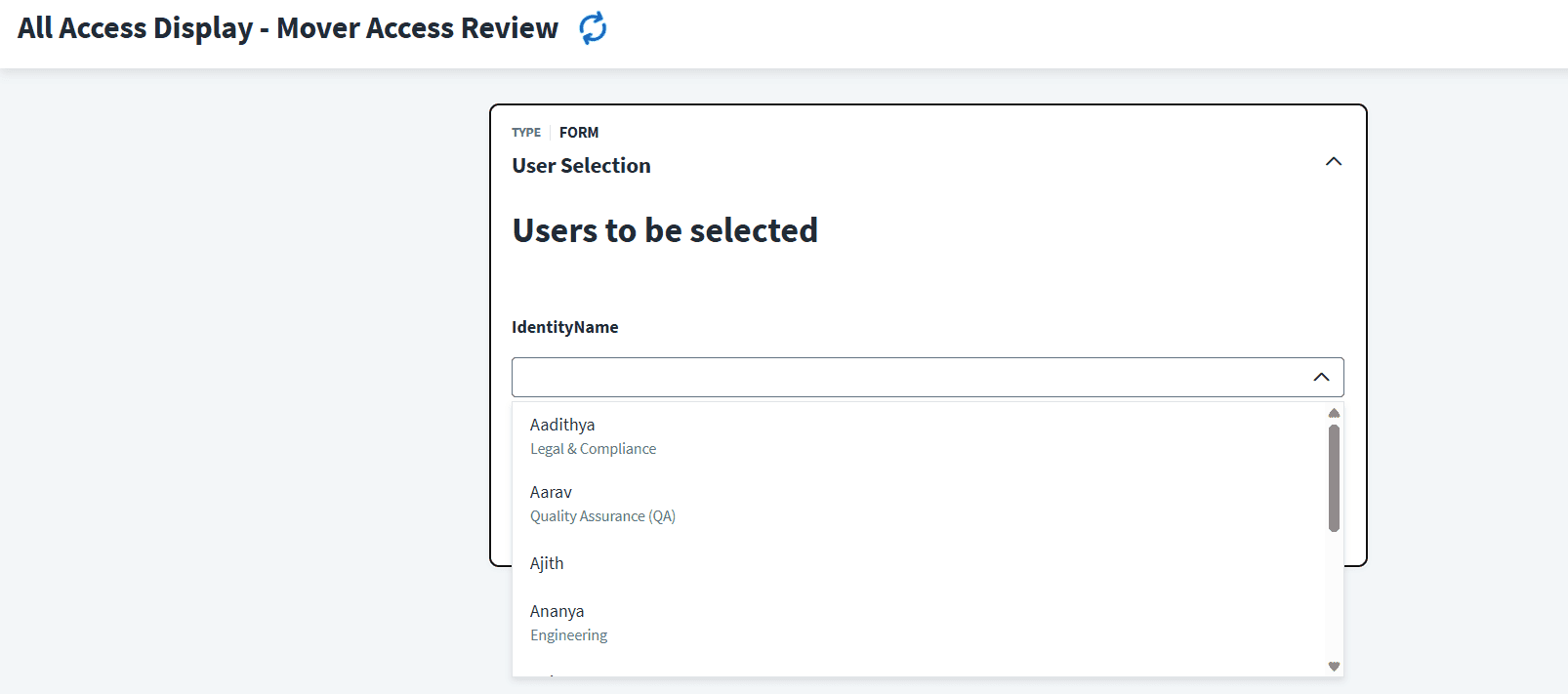
The Interactive Form is the first screen the user sees when they launch the workflow. The form is configured to present a searchable dropdown list of all identities in the ISC tenant, allowing the reviewer to select the specific mover identity they want to review.
Form Fields
Identity Select Field - populated dynamically with all tenant identities.
Display Name shown for each identity for easy identification.
On form submission, the selected identity reference is passed into the workflow context.
Once the reviewer selects an identity and clicks Submit, the workflow begins execution with that identity as the input. All subsequent steps use this identity reference to fetch access and create the certification.
Step 3 - Fetching Identity and Current Access
Get Identity Step
The Get Identity step retrieves the full identity object from SailPoint ISC using the identity reference passed from the form. This provides access to identity attributes such as display name, email, manager reference, and department - which are used in the email notification steps.
HTTP Action - Search Endpoint
To retrieve the current access for the identity, the workflow uses an HTTP Action calling the SailPoint ISC Search API endpoint. The Search endpoint will fetch all entitlements of the identity from all sources.
This API endpoint response returns a list of entitlements contains the entitlement name and the source it belongs to. These two lists contains access items and source names are extracted using JSONPath expressions and stored as workflow variables for use in the email step.
accessItems - list of entitlement names assigned to the identity.
accessSources - list of source names aligned by index with accessItems.
identityName - the display name of the mover identity.
Step 4 - Displaying Access in Email Using Velocity Templating
What is Velocity Templating?
SailPoint ISC's Send Email action supports Apache Velocity - a templating engine that allows dynamic content to be generated inside the email body using variables and logic. This means the email content is not static - it is built at runtime based on the actual data from the workflow.
Templating Context - Mapping Variables
Before writing the email body, a Templating Context is configured in the Send Email step. This context maps three workflow variables into Velocity variables that can be used inside the email HTML:
$accessItems - the list of entitlements fetched from the Search API.
$accessSources - the list of source names aligned by index.
$identityName - the display name of the mover identity.
Handling ArrayList vs Single String
A key challenge in SailPoint ISC Velocity templating is that when an identity has multiple entitlements, ISC returns the data as a Java ArrayList. However, when there is only one entitlement, ISC returns it as a plain String - not a list. The email template must handle both cases separately to avoid runtime errors.
If $accessItems is an ArrayList - use a #foreach loop to render all entitlements.
If $accessItems is a String - render a single row directly without looping.
Source Grouping Logic
To improve readability, entitlements are grouped by their source name in the email table. A variable $prevSource tracks the previously rendered source. Each time when the source changes in the table it will rendered with new group with source name else if the source is same it will skip.
Serial Number Counter
Apache Velocity does not provide an automatic row counter. A manual counter variable $count is initialized to 1 before the loop begins. After each entitlement row is rendered, $count is incremented by 1 using a #set directive. This produces a clean serial number column in the email table.

Step 5 - Creating Access Certification Campaign
What is Access Based Certification?
Access Based Certification in SailPoint ISC is a structured review process where a manager or reviewer is presented with a list of entitlements held by an identity and must make a decision - Approve or Revoke - for each one. This creates an auditable record of the review decision.
HTTP Action - Create Certification Endpoint
The workflow uses an HTTP Action to call the SailPoint ISC Create Certification API. The request payload includes the identity ID of the mover, the reviewer (manager), and the campaign type as Access. Once the API call succeeds, ISC automatically creates the certification campaign and activates it for the assigned reviewer.
Campaign is created automatically - no manual setup required.
The mover identity's access is pre-loaded into the campaign.
The assigned reviewer (manager) sees the campaign in their ISC Certification dashboard.
Each entitlement appears as a separate item to approve or revoke.
Step 6 - Manager Notification and Certification
Send Email to Manager
Once the certification campaign is created, the workflow sends an email to the manager informing them that a Mover Access Review has been initiated for their direct report. The email includes a direct link to the ISC Certification Page where the manager can review and make decisions on the access items.
Active Phase - Certification Page
The manager logs into SailPoint ISC and navigates to the Certifications section. The campaign created by the workflow appears in Active status. The manager can see each entitlement listed along with its source name, and must make one of the following decisions for each item:
Approve - the identity retains this access in their new role.
Revoke - the access is removed as it is no longer needed.
Once all items are reviewed and the campaign is signed off, the certification is completed. SailPoint ISC automatically processes any revocation decisions and triggers provisioning to remove the access from the relevant source systems. The workflow then reaches the End step with a success status.
Conclusion
The Mover Access Review workflow built in SailPoint ISC demonstrates how a complex identity governance process can be fully automated with zero manual effort after the initial trigger. By combining the Interactive Trigger, dynamic form input, HTTP Actions for access retrieval and certification creation, and Velocity-powered email templating, the entire review cycle is handled end-to-end by the workflow.
Managers receive a clear, structured email showing all current entitlements of the mover, and are directed to the ISC Certification Page to make informed approve or revoke decisions

