File access management workflow with automated identity verification and secure folder permissions.

SailPoint FAM Access Requests: Configuration Guide

Date Posted:

Category:

Security

Author:

Dhanasekar

File access management workflow with automated identity verification and secure folder permissions.

SailPoint FAM Access Requests: Configuration Guide

Date Posted:

Category:

Security

Author:

Dhanasekar

File access management workflow with automated identity verification and secure folder permissions.

SailPoint FAM Access Requests: Configuration Guide

Date Posted:

Category:

Security

Author:

Dhanasekar

Listen Instead of Reading

Listen Instead of Reading

05:11 Min
00:00-05:11

SailPoint File Access Manager – Access Request & Normalization Configuration

Overview

This document explains how to configure Normalization, Access Fulfillment, Access Request Templates, and Requestable Resources for enabling automated access requests in SailPoint File Access Manager (FAM).
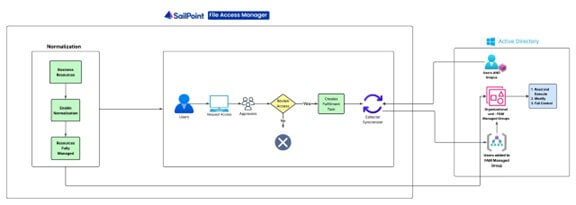
SailPoint File Access Manager workflow showing access request processing, normalization, and Active Directory integration.

Normalization Configuration

Normalization is the process where FAM converts folder ACLs into clean, group-based access using FAM-managed AD groups. This enables automatic granting and revoking of access.

Create Managed Group OU in Active Directory

Create an Organizational Unit to store all FAM-managed groups.

  • OU Name: FAM Managed Groups

  • DN: OU=FAM Managed Groups,DC=Test,DC=com

Configure Application for Access Fulfillment

Path: Applications → Edit Application → Access Fulfillment

Configure the following:

  • Enable Access Fulfillment for Normalized Groups.

  • Select AD Identity Collector.

  • Set Managed Group OU DN.

  • Configure handling for List Folder permissions and Inexact Permission Matches.

Setting

Meaning

Enable Access Fulfillment for Normalized Groups

Allows FAM to create AD groups and manage access through them

Enable Fulfillment for Revoking Explicit Permissions

FAM can remove direct ACL permissions if required

Managed Group OU

Where FAM stores permission groups

How to Handle List Folder Permissions

Whether to create a "List" group or revoke

Inexact Permission Matches

How FAM handles non-standard permissions

Note: Normalization always creates new FAM-managed groups for each folder. The Template Permission Group option just lets us optionally give an extra existing group (like TEST Domain Guests) the same permission on every normalized folder, so all its members get that access automatically.

Normalize Resources

Path: Applications → Manage Resources → Manage Normalization

  • Enable normalization for selected folders and choose a rule for handling non-standard permissions.

Option

Meaning

Fail Normalization

Stops if FAM finds a non-standard permission

Elevate

Converts odd permission to the next higher standard (may increase access)

Revoke

Removes odd parts and assigns only the lower closest standard (may reduce access)

After Normalization

After normalization completes:

  • FAM creates permission groups in Managed Group OU.

  • Updates folder ACL using only FAM groups.

  • Moves existing users into matching groups.

  • Resources become Fully Managed.

Access Request Configuration

Path: FAM Client → Access Request

  • This section describes how to configure Access Requests so users can request permissions to normalized folders.

Configure Requestable Resources

Path: FAM Client → Access Requests → Configuration → Manage Requestable Resources

  • Select which folders can be requested by users.

Configure Requestable Permission Types

Define which permissions users can request, such as Read & Execute, Modify, Full Control.

Create Access Request Template

Path: FAM Client → Access Requests → Configuration → Manage Access Request Templates

  • Templates define approval workflow, allowed permissions, and fulfillment type (Automatic for normalized folders).

User Access Request Flow

  • User submits request from FAM Web UI.

  • Workflow sends it for approval.

  • Upon approval, FAM automatically adds user to relevant AD group.

  • User receives access.

Manual Fulfillment Process

Manual Fulfillment means FAM does not automatically grant or revoke permissions. After approval, an administrator must manually apply permissions on the target system and mark the request as Completed in FAM.

When Manual Fulfillment Is Used

  • Resources are not normalized.

  • Application does not support automatic fulfillment.

  • Permissions must be managed outside FAM.

  • Custom or legacy ACL structures.

Advantages of Automatic Fulfillment

  • Fully automated grant/revoke.

  • Consistent permission updates using managed AD groups.

  • Suitable for large environments.

  • Full audit trail.

  • Supports certifications.

Disadvantages of Automatic Fulfillment

  • Requires normalization.

  • Requires AD Identity Collector with written permissions.

  • Not suitable for non-standard ACL structures.

Advantages of Manual Fulfillment

  • Works with any resource.

  • No need for AD group creation.

  • Full control for administrators.

  • Supports legacy/custom ACLs.

Disadvantages of Manual Fulfillment

  • Slow and requires IT intervention.

  • Cannot be used for automated revocations.


Stay tuned to our blog to see more posts about

Sailpoint products implementation and its related updates.

Stay tuned to our blog to see more posts about SailPoint products implementation and its related updates.

Category:

Category:

Security

Security

For more detail or questions

For more detail or questions

Listen Instead of Reading
05:11 Min
00:00-05:11

SailPoint File Access Manager – Access Request & Normalization Configuration

Overview

This document explains how to configure Normalization, Access Fulfillment, Access Request Templates, and Requestable Resources for enabling automated access requests in SailPoint File Access Manager (FAM).

SailPoint File Access Manager workflow showing access request processing, normalization, and Active Directory integration.

Normalization Configuration

Normalization is the process where FAM converts folder ACLs into clean, group-based access using FAM-managed AD groups. This enables automatic granting and revoking of access.

Create Managed Group OU in Active Directory

Create an Organizational Unit to store all FAM-managed groups.

  • OU Name: FAM Managed Groups

  • DN: OU=FAM Managed Groups,DC=Test,DC=com

Configure Application for Access Fulfillment

Path: Applications → Edit Application → Access Fulfillment

Configure the following:

  • Enable Access Fulfillment for Normalized Groups.

  • Select AD Identity Collector.

  • Set Managed Group OU DN.

  • Configure handling for List Folder permissions and Inexact Permission Matches.

Setting

Meaning

Enable Access Fulfillment for Normalized Groups

Allows FAM to create AD groups and manage access through them

Enable Fulfillment for Revoking Explicit Permissions

FAM can remove direct ACL permissions if required

Managed Group OU

Where FAM stores permission groups

How to Handle List Folder Permissions

Whether to create a "List" group or revoke

Inexact Permission Matches

How FAM handles non-standard permissions

Note: Normalization always creates new FAM-managed groups for each folder. The Template Permission Group option just lets us optionally give an extra existing group (like TEST Domain Guests) the same permission on every normalized folder, so all its members get that access automatically.

Normalize Resources

Path: Applications → Manage Resources → Manage Normalization

  • Enable normalization for selected folders and choose a rule for handling non-standard permissions.

Option

Meaning

Fail Normalization

Stops if FAM finds a non-standard permission

Elevate

Converts odd permission to the next higher standard (may increase access)

Revoke

Removes odd parts and assigns only the lower closest standard (may reduce access)

After Normalization

After normalization completes:

  • FAM creates permission groups in Managed Group OU.

  • Updates folder ACL using only FAM groups.

  • Moves existing users into matching groups.

  • Resources become Fully Managed.

Access Request Configuration

Path: FAM Client → Access Request

  • This section describes how to configure Access Requests so users can request permissions to normalized folders.

Configure Requestable Resources

Path: FAM Client → Access Requests → Configuration → Manage Requestable Resources

  • Select which folders can be requested by users.

Configure Requestable Permission Types

Define which permissions users can request, such as Read & Execute, Modify, Full Control.

Create Access Request Template

Path: FAM Client → Access Requests → Configuration → Manage Access Request Templates

  • Templates define approval workflow, allowed permissions, and fulfillment type (Automatic for normalized folders).

User Access Request Flow

  • User submits request from FAM Web UI.

  • Workflow sends it for approval.

  • Upon approval, FAM automatically adds user to relevant AD group.

  • User receives access.

Manual Fulfillment Process

Manual Fulfillment means FAM does not automatically grant or revoke permissions. After approval, an administrator must manually apply permissions on the target system and mark the request as Completed in FAM.

When Manual Fulfillment Is Used

  • Resources are not normalized.

  • Application does not support automatic fulfillment.

  • Permissions must be managed outside FAM.

  • Custom or legacy ACL structures.

Advantages of Automatic Fulfillment

  • Fully automated grant/revoke.

  • Consistent permission updates using managed AD groups.

  • Suitable for large environments.

  • Full audit trail.

  • Supports certifications.

Disadvantages of Automatic Fulfillment

  • Requires normalization.

  • Requires AD Identity Collector with written permissions.

  • Not suitable for non-standard ACL structures.

Advantages of Manual Fulfillment

  • Works with any resource.

  • No need for AD group creation.

  • Full control for administrators.

  • Supports legacy/custom ACLs.

Disadvantages of Manual Fulfillment

  • Slow and requires IT intervention.

  • Cannot be used for automated revocations.


Stay tuned to our blog to see more posts about

Sailpoint products implementation and its related updates.

Category:

Security

For more detail or questions

For more detail or questions