Metadata-Driven Access Approvals in SailPoint ISC Guide

Date Posted:

Category:

Security

Author:

Gopi

Metadata-Driven Access Approvals in SailPoint ISC Guide

Date Posted:

Category:

Security

Author:

Gopi

Metadata-Driven Access Approvals in SailPoint ISC Guide

Date Posted:

Category:

Security

Author:

Gopi

Get your Tailored Quote for your Organisation

Get your Tailored Quote for your Organisation

Get your Tailored Quote for your Organisation

Streamlining Access Approvals in SailPoint ISC Using Metadata-Driven Workflows

Why We Needed a Better Approval Process

In most projects I’ve worked on, access approvals usually start off very simple—every request follows the same path, typically going to a manager or a predefined group. While that works initially, it quickly becomes a problem as systems grow.

Not all access is the same. Giving someone the read-only access to a report is very different from granting admin privileges to a production system. But if both requests follow the same approval flow, it either slow down things unnecessarily or introduces new risk.

This is where we started looking at making approvals more context-aware instead of static.

Using Metadata to Make Smarter Decisions

One thing that really helps in SailPoint ISC is the metadata attached to access items. Most organizations already have useful attributes like:

  • Whether the access is privileged

  • The risk level associated with it

  • The application or source it belongs to

Instead of ignoring this data, we decided to use it directly in the workflow. The idea was simple: let the system decide the approval path based on what kind of access is being requested.

How the Workflow Actually Works

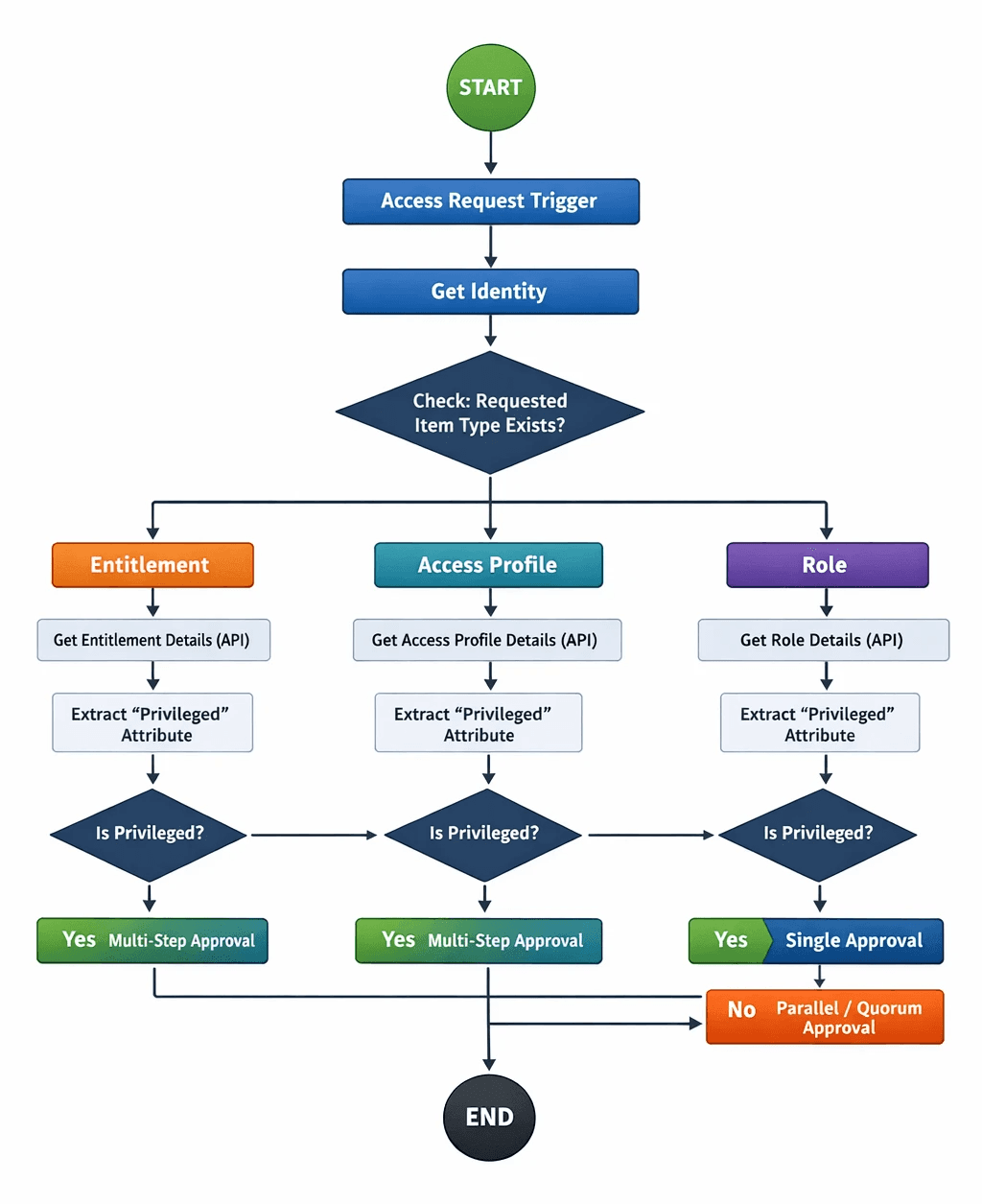
At a high level, the workflow starts when a user raises an access request from request center or through APIs. From there, instead of immediately sending it for approval, we first try to understand what exactly is being requested.

The workflow checks the type of item that being requested--whether it’s an entitlement, access profile, or role. Based on that, it makes an API call to fetch all details about the item.

This is important because the metadata we need (like whether it’s privileged or requires Training) isn’t directly available in the trigger. So, we need to fetch it dynamically.

Extracting the Important Information

Once we have the API response on hand, the next step is to extract the relevant metadata from the response (like privileged, etc..). Since these attributes come in as a list, we don’t assume any fixed position. Instead, we loop through the attributes and look specifically for the key we care about “privileged”.  We can use any Metadata attributes for Streamline the approvals in workflow.

When we find those metadata attributes, we extract the value (usually “Yes” or “No” or it might be different according to the Metadata) and store it in a variable for the next step.

This approach makes the workflow more reliable in real time, especially when the data structure changes or new attributes are added.

Where the Real Decision Happens

This is the part that makes the whole setup useful.

Once we know whether the access is privileged or not, the workflow decides how strict the approval process should be.

  • If it’s privileged access, we don’t take chances. The request goes through multiple levels of approval—typically the manager followed by a security or governance team.

  • If it’s not privileged, we keep it simple and route it just to the manager.

  • In certain critical cases, we also experimented with quorum-based approvals where multiple reviewers are involved, but only a percentage of approvals is required.

This way, we’re not overcomplicating low-risk requests while still maintaining strong control over sensitive access.

Setting Up the Approval Policies

SailPoint’s Approval Policy action makes this fairly flexible. In our implementation, we used different types of approvals depending on the situation:

  • Single approval for straightforward, low-risk requests.

  • Multi-step (serial) approval for privileged access.

  • Quorum approval for scenarios where multiple stakeholders needed to weigh in.

Another useful aspect is that reviewers don’t have to be hardcoded. We can assign them dynamically—manager, application owner, or even a governance group—depending on the context.

What This Looks Like in a Real Scenario

Let’s say a user requests access to a database (admin access).

If the access is flagged as privileged, the workflow automatically routes access requests approvals to both the manager and the security team. This ensures that sensitive access is properly reviewed before being granted to the end users.

On the other hand, if the same user requests something like read-only access (non privileged), the workflow recognizes it automatically based on the metadata that is provided and it is considered as low risk and keeps the approval process simple. The manager approves it (we can route to any users according to our policy configuration), and the request moves forward quickly.

This balance is what we were aiming for—strong governance without slowing down everyday operations.
What We Gained from This Approach

After implementing this, a few things improved noticeably.

Approvals became faster for low-risk access because we removed unnecessary steps. At the same time, privileged access requests received the attention they needed.

It also made audits easier. Since the approval path was based on metadata, it was clear why a particular request followed a specific route.

Most importantly, the system became easier to scale. As new applications or access types were added, we didn’t have to redesign the workflow—metadata handled most of the logic.

Final Thoughts

What worked well here was not just using workflows, but using them intelligently. Instead of hardcoding rules, we let metadata drive the decisions.

SailPoint ISC gives all the building blocks—APIs, workflows, approval policies—but the real value comes from how you combine them.

For us, moving to a metadata-driven approval model made the process more practical, more secure, and much easier to manage in the long run.


Stay tuned to our blog to see more posts about

Sailpoint products implementation and its related updates.

Stay tuned to our blog to see more posts about SailPoint products implementation and its related updates.

Category:

Category:

Security

Security

Streamlining Access Approvals in SailPoint ISC Using Metadata-Driven Workflows

Why We Needed a Better Approval Process

In most projects I’ve worked on, access approvals usually start off very simple—every request follows the same path, typically going to a manager or a predefined group. While that works initially, it quickly becomes a problem as systems grow.

Not all access is the same. Giving someone the read-only access to a report is very different from granting admin privileges to a production system. But if both requests follow the same approval flow, it either slow down things unnecessarily or introduces new risk.

This is where we started looking at making approvals more context-aware instead of static.

Using Metadata to Make Smarter Decisions

One thing that really helps in SailPoint ISC is the metadata attached to access items. Most organizations already have useful attributes like:

  • Whether the access is privileged

  • The risk level associated with it

  • The application or source it belongs to

Instead of ignoring this data, we decided to use it directly in the workflow. The idea was simple: let the system decide the approval path based on what kind of access is being requested.

How the Workflow Actually Works

At a high level, the workflow starts when a user raises an access request from request center or through APIs. From there, instead of immediately sending it for approval, we first try to understand what exactly is being requested.

The workflow checks the type of item that being requested--whether it’s an entitlement, access profile, or role. Based on that, it makes an API call to fetch all details about the item.

This is important because the metadata we need (like whether it’s privileged or requires Training) isn’t directly available in the trigger. So, we need to fetch it dynamically.

Extracting the Important Information

Once we have the API response on hand, the next step is to extract the relevant metadata from the response (like privileged, etc..). Since these attributes come in as a list, we don’t assume any fixed position. Instead, we loop through the attributes and look specifically for the key we care about “privileged”.  We can use any Metadata attributes for Streamline the approvals in workflow.

When we find those metadata attributes, we extract the value (usually “Yes” or “No” or it might be different according to the Metadata) and store it in a variable for the next step.

This approach makes the workflow more reliable in real time, especially when the data structure changes or new attributes are added.

Where the Real Decision Happens

This is the part that makes the whole setup useful.

Once we know whether the access is privileged or not, the workflow decides how strict the approval process should be.

  • If it’s privileged access, we don’t take chances. The request goes through multiple levels of approval—typically the manager followed by a security or governance team.

  • If it’s not privileged, we keep it simple and route it just to the manager.

  • In certain critical cases, we also experimented with quorum-based approvals where multiple reviewers are involved, but only a percentage of approvals is required.

This way, we’re not overcomplicating low-risk requests while still maintaining strong control over sensitive access.

Setting Up the Approval Policies

SailPoint’s Approval Policy action makes this fairly flexible. In our implementation, we used different types of approvals depending on the situation:

  • Single approval for straightforward, low-risk requests.

  • Multi-step (serial) approval for privileged access.

  • Quorum approval for scenarios where multiple stakeholders needed to weigh in.

Another useful aspect is that reviewers don’t have to be hardcoded. We can assign them dynamically—manager, application owner, or even a governance group—depending on the context.

What This Looks Like in a Real Scenario

Let’s say a user requests access to a database (admin access).

If the access is flagged as privileged, the workflow automatically routes access requests approvals to both the manager and the security team. This ensures that sensitive access is properly reviewed before being granted to the end users.

On the other hand, if the same user requests something like read-only access (non privileged), the workflow recognizes it automatically based on the metadata that is provided and it is considered as low risk and keeps the approval process simple. The manager approves it (we can route to any users according to our policy configuration), and the request moves forward quickly.

This balance is what we were aiming for—strong governance without slowing down everyday operations.

What We Gained from This Approach

After implementing this, a few things improved noticeably.

Approvals became faster for low-risk access because we removed unnecessary steps. At the same time, privileged access requests received the attention they needed.

It also made audits easier. Since the approval path was based on metadata, it was clear why a particular request followed a specific route.

Most importantly, the system became easier to scale. As new applications or access types were added, we didn’t have to redesign the workflow—metadata handled most of the logic.

Final Thoughts

What worked well here was not just using workflows, but using them intelligently. Instead of hardcoding rules, we let metadata drive the decisions.

SailPoint ISC gives all the building blocks—APIs, workflows, approval policies—but the real value comes from how you combine them.

For us, moving to a metadata-driven approval model made the process more practical, more secure, and much easier to manage in the long run.


Stay tuned to our blog to see more posts about

Sailpoint products implementation and its related updates.

Category:

Security