Digital graphic of a cloud transferring data securely to a user protection shield with security icons.

Integrating Salesforce Accounts into SailPoint ISC Guide

Date Posted:

Category:

Security

Author:

Valarmathi

Digital graphic of a cloud transferring data securely to a user protection shield with security icons.

Integrating Salesforce Accounts into SailPoint ISC Guide

Date Posted:

Category:

Security

Author:

Valarmathi

Digital graphic of a cloud transferring data securely to a user protection shield with security icons.

Integrating Salesforce Accounts into SailPoint ISC Guide

Date Posted:

Category:

Security

Author:

Valarmathi

Introduction

Salesforce is a Cloud Based CRM platform used by sales, marketing, support and business teams. Here we can store sensitive customer data. The user in salesforce is assigned by Profiles, Roles, Permission Sets. In salesforce maintaining access is challengeable because it contains customer sensitive information and data and also it connects to multiple third-party systems.

Here we are integrating Salesforce into ISC to manage user management and governance. In salesforce manual user management leads to orphan accounts, delayed access removal, Over-permissioned user, compliance risks. So, In ISC provides identity governance, automated provisioning, Lifecycle management, Certification campaigns, Access reviews.

After Integration SailPoint can manage:

  • Automate user onboarding (Joiner process).

  • Updating access when employee changes the role (Mover process).

  • Disable access when employee leaves (Leaver process).

  • Assigning roles and permission sets automatically.

  • Performing periodic access certifications.

  • Maintaining audit logs for compliance.

Pre-Requisites

After login into salesforce instance the login account has the system administrator profile. Using the System admin profile, we can customize and configure the application based on requirements. Some required permissions are needed as follows.

  • System administrator profile permissions.

  • Has access to all functionality that does not require an additional license.

  • Can create, edit, and delete custom profiles.

  • Can reset password of multiple user accounts.

  • Can add multiple user accounts.

  • user accounts and profile permissions are accessible.

  • Enable and disable user accounts.

Salesforce Setup

  1. System Administrators can configure Users, Roles, and Profiles from the Setup area.

  2. To access these settings when logged in to Salesforce, select your name, then select Setup from the drop-down menu.

  3. The Users, Roles, and Profiles settings are all available under Users in the Administration Setup menu.

  4. Create users with different profiles and access.

  5. Get the service account username and password.

  6. Get security token it needs to be mapped with the password.
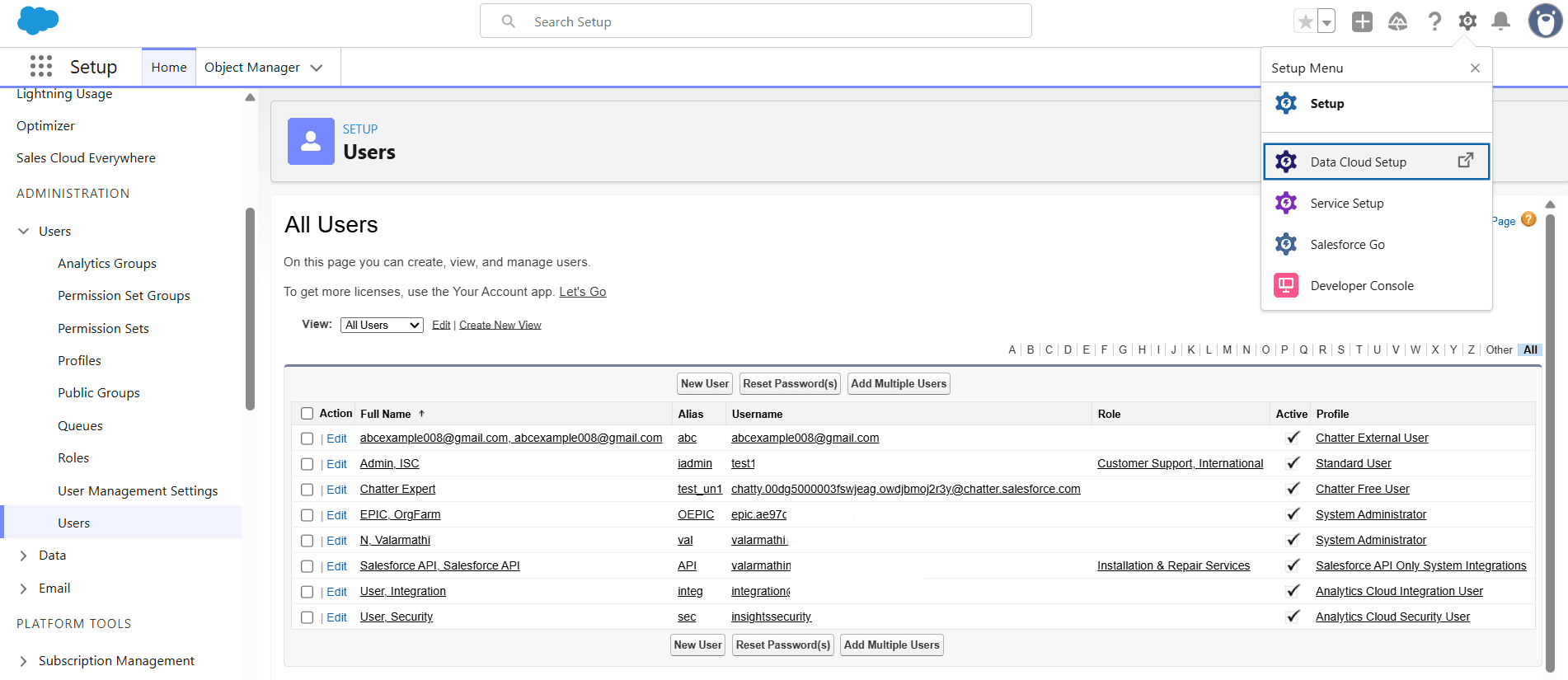
Salesforce Setup interface displaying the All Users management list and the top-right Setup Menu dropdown options.

In the above picture we can create users, profiles, permission sets, roles and assign it to the users. Also, we can reset the passwords.
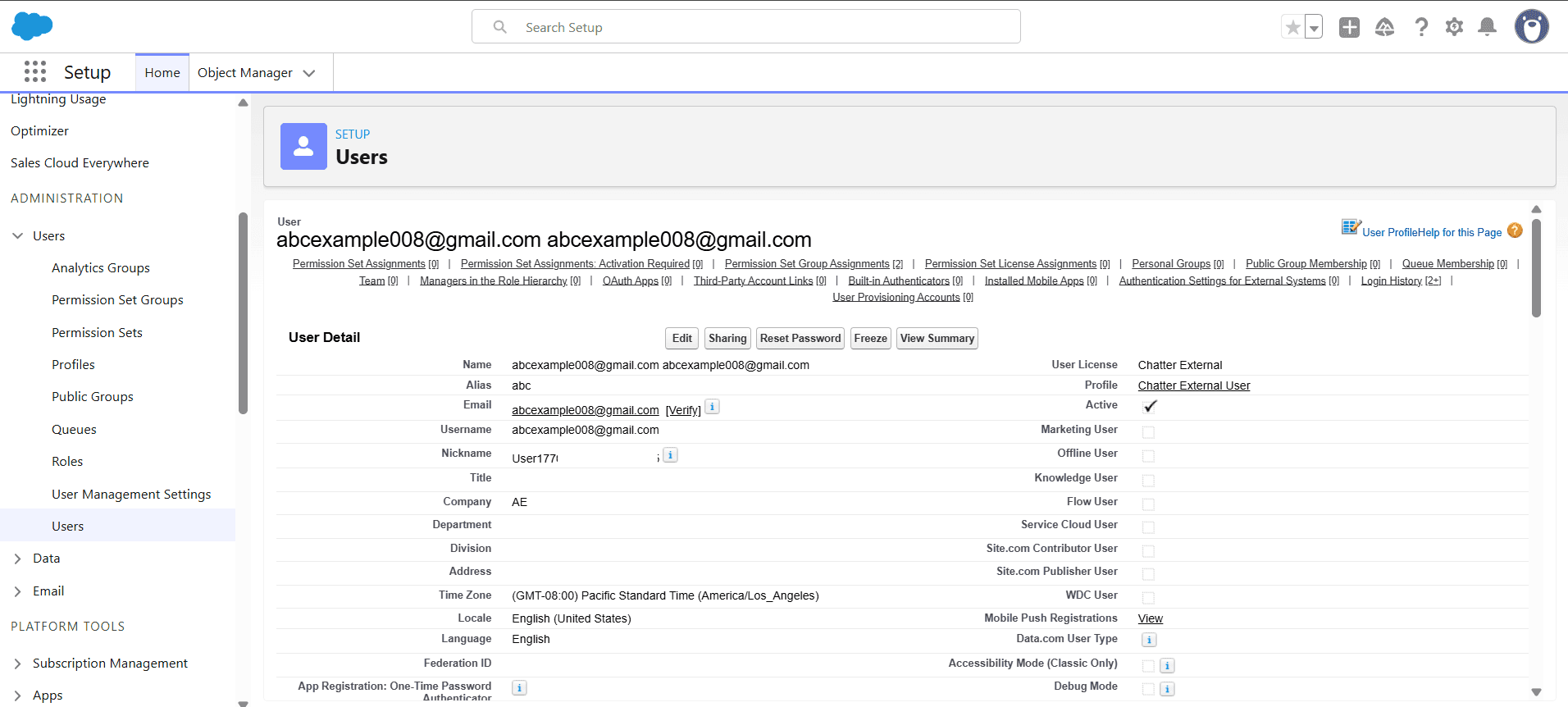
Salesforce User Detail configuration page displaying account information, license type, and assigned profile settings.

In the above picture we can edit the given details, also we can add/update/remove permission set assignments, permission set groups, permission set license, User provisioning accounts, authentication settings, login history.

Integrating into SailPoint ISC

Choose specific Connector type as Salesforce SAAS and configure.
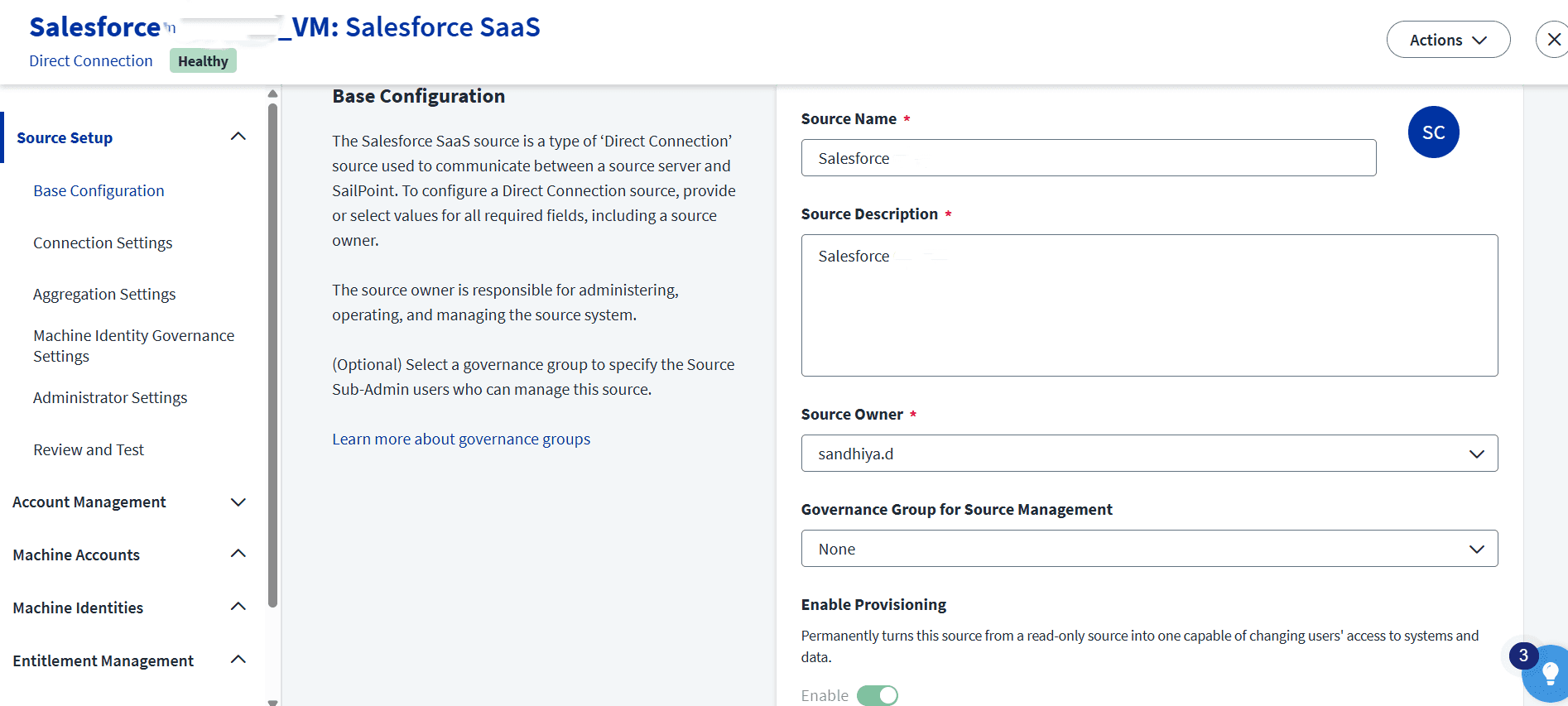
SailPoint ISC Base Configuration screen for setting up a Salesforce SaaS source with name, description, and source owner fields.

In Connection Settings

  • Choose the authentication type as Basic.

  • Provide Salesforce instance URL.

  • Provide Service account and password [password + security token].
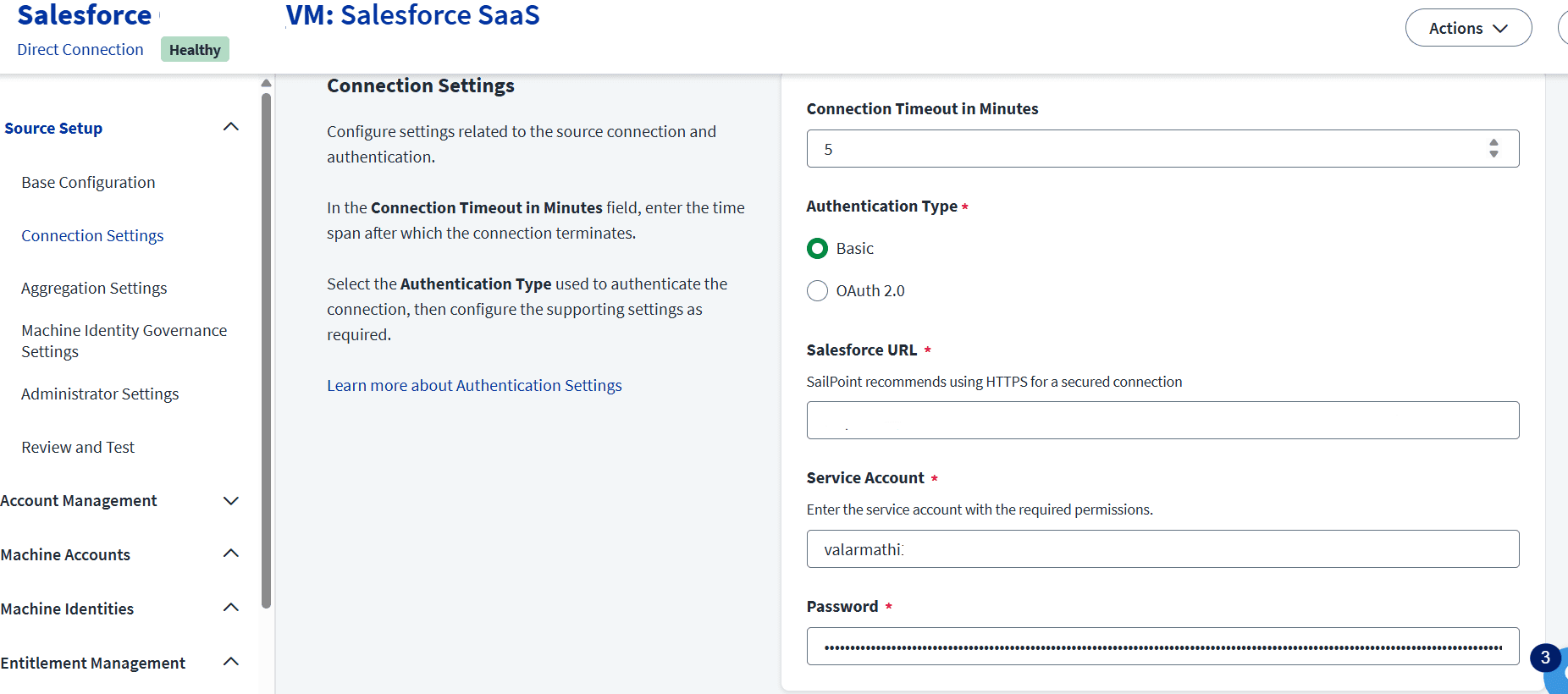
SailPoint ISC Connection Settings screen configuring authentication type, timeout duration, Salesforce URL, and service account credentials.

After providing the details start with test connection.
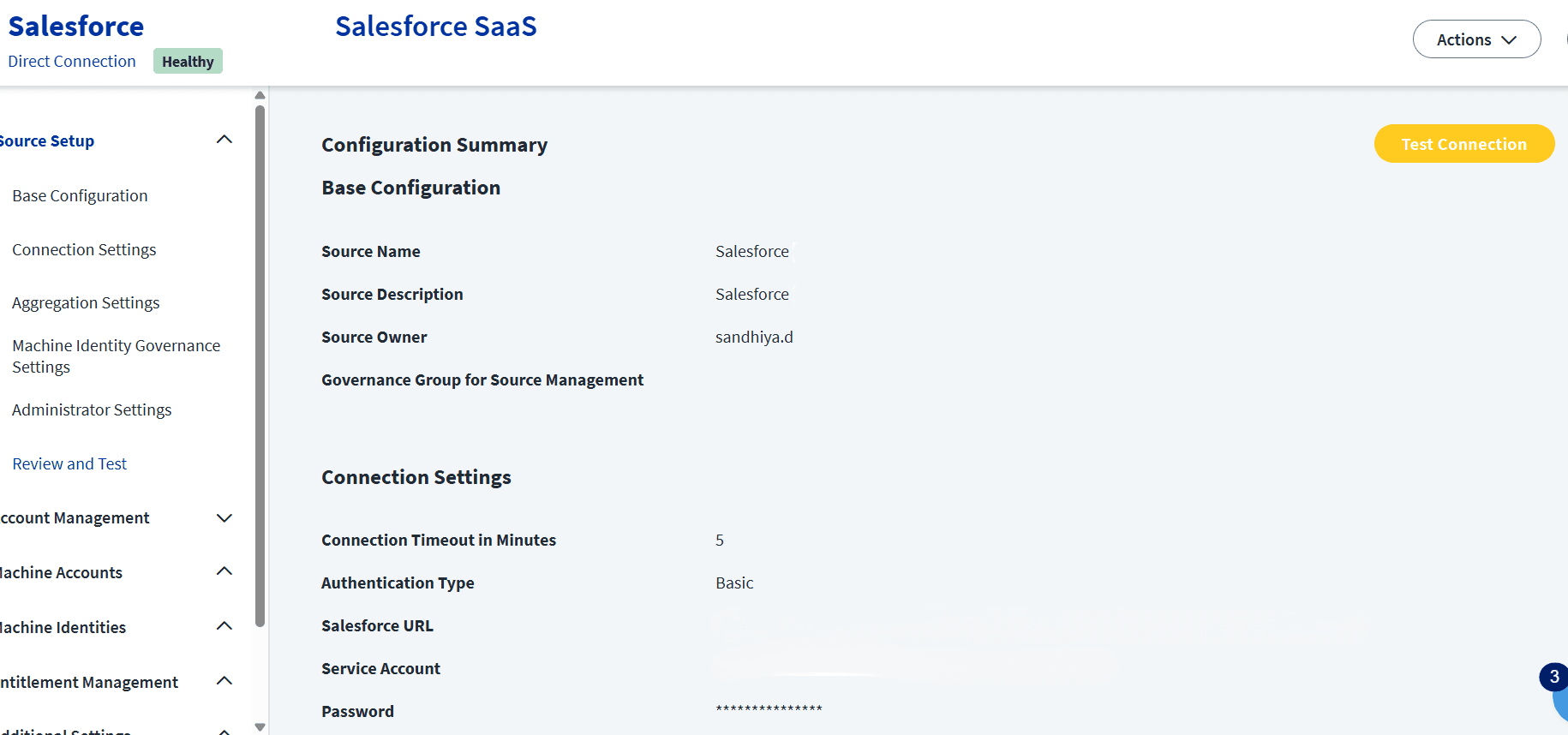
SailPoint ISC Review and Test interface showing the Configuration Summary for a Salesforce SaaS source setup with a Test Connection button.

Account Management Settings

After test connection all salesforce attributes are pulled into ISC. These are some of the attributes from salesforce Id, Username, Email, FirstName, LastName, IsActive, ProfileId, UserRoleId, isFrozen attribute.
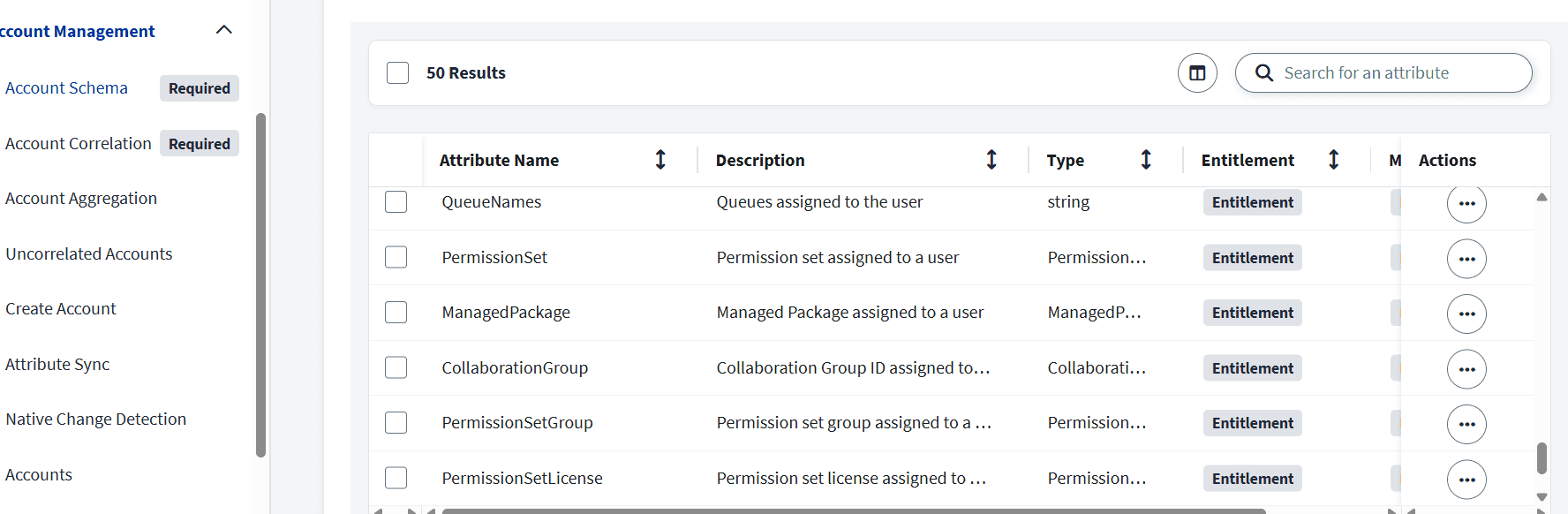
SailPoint ISC Account Schema configuration screen displaying user entitlement attribute mappings like QueueNames and PermissionSet.

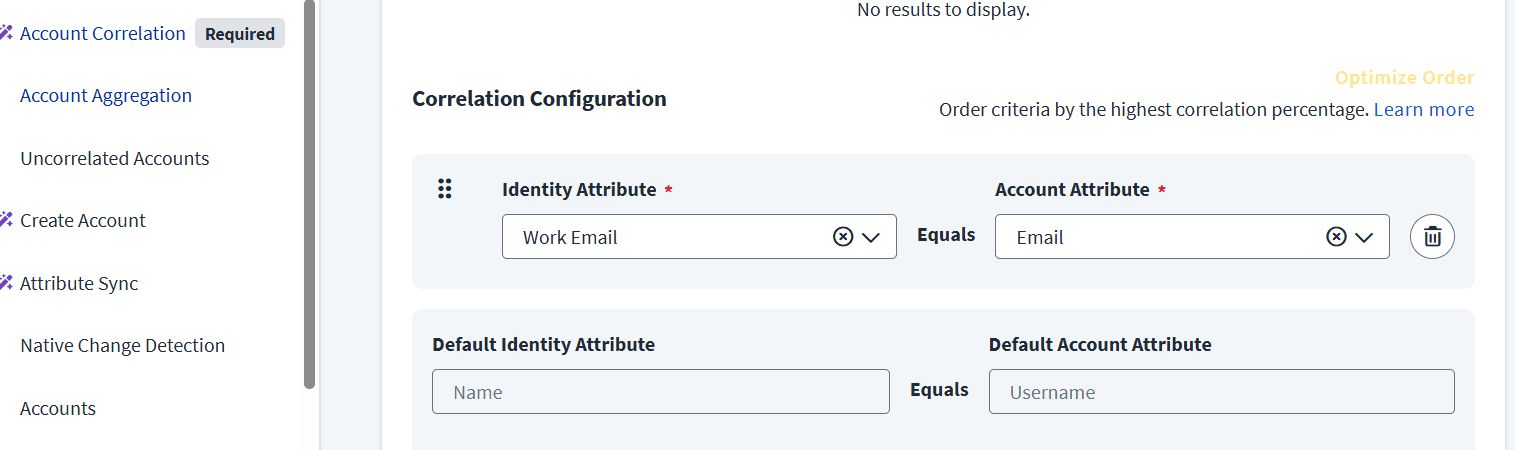
Correlation Configuration Settings

  • In correlation need to map how accounts link to identities using attributes like

  • Identity.email = Salesforce.email

SailPoint ISC Correlation Configuration screen mapping the Work Email identity attribute to the Salesforce Email account attribute.

Aggregation settings

  • Start aggregation in ISC.

  • After aggregation all the accounts from salesforce pulled into SailPoint ISC.

  • Profiles and roles also imported from salesforce as entitlements.
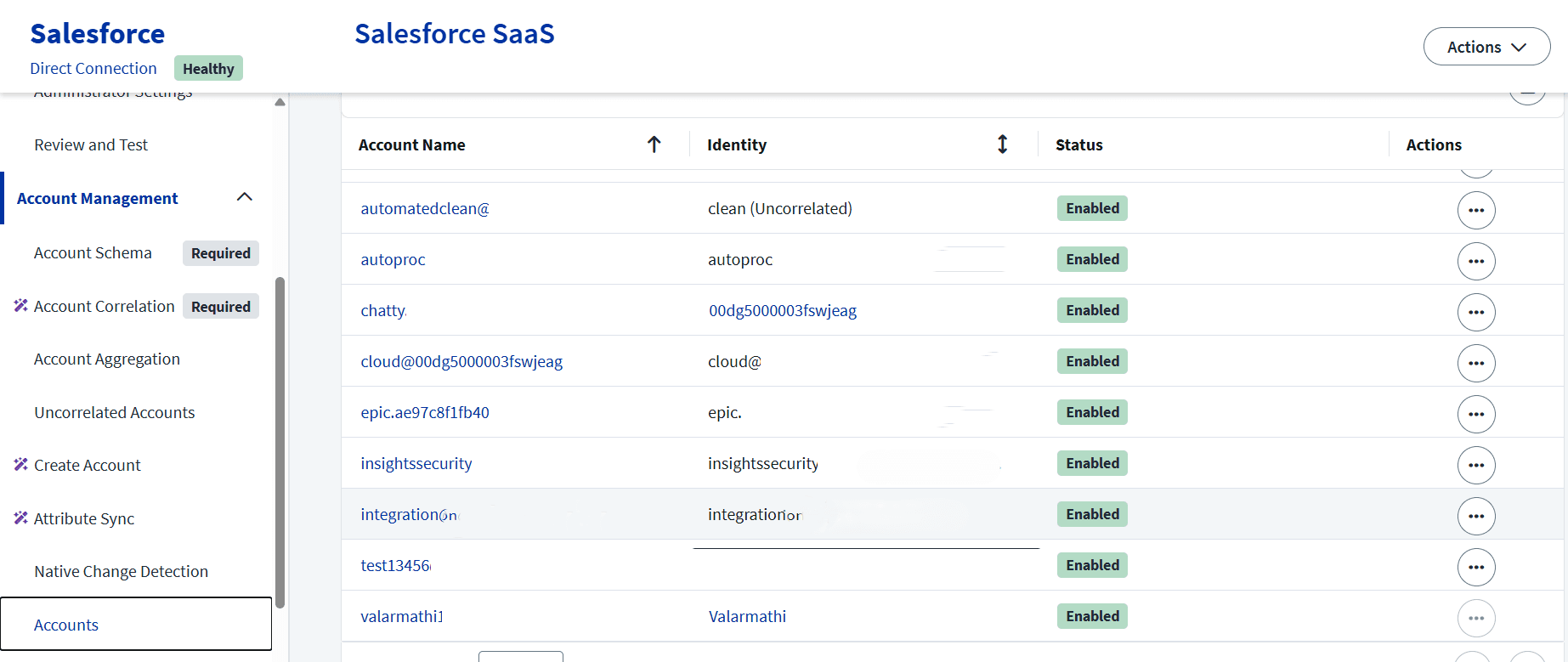
SailPoint ISC Accounts management interface displaying aggregated Salesforce accounts, associated identity mappings, and active statuses.

Stay tuned to our blog to see more posts about

Sailpoint products implementation and its related updates.

Stay tuned to our blog to see more posts about

Sailpoint products implementation and its related updates.

Category:

Security

Stay tuned to our blog to see more posts about

Sailpoint products implementation and its related updates.

Stay tuned to our blog to see more posts about

Sailpoint products implementation and its related updates.

Category:

Category:

Security

Security

Get your

Tailored Quote for your

Organisation

Get your

Tailored Quote for your

Organisation

Introduction

Salesforce is a Cloud Based CRM platform used by sales, marketing, support and business teams. Here we can store sensitive customer data. The user in salesforce is assigned by Profiles, Roles, Permission Sets. In salesforce maintaining access is challengeable because it contains customer sensitive information and data and also it connects to multiple third-party systems.

Here we are integrating Salesforce into ISC to manage user management and governance. In salesforce manual user management leads to orphan accounts, delayed access removal, Over-permissioned user, compliance risks. So, In ISC provides identity governance, automated provisioning, Lifecycle management, Certification campaigns, Access reviews.

After Integration SailPoint can manage:

  • Automate user onboarding (Joiner process).

  • Updating access when employee changes the role (Mover process).

  • Disable access when employee leaves (Leaver process).

  • Assigning roles and permission sets automatically.

  • Performing periodic access certifications.

  • Maintaining audit logs for compliance.

Pre-Requisites

After login into salesforce instance the login account has the system administrator profile. Using the System admin profile, we can customize and configure the application based on requirements. Some required permissions are needed as follows.

  • System administrator profile permissions.

  • Has access to all functionality that does not require an additional license.

  • Can create, edit, and delete custom profiles.

  • Can reset password of multiple user accounts.

  • Can add multiple user accounts.

  • user accounts and profile permissions are accessible.

  • Enable and disable user accounts.

Salesforce Setup

  1. System Administrators can configure Users, Roles, and Profiles from the Setup area.

  2. To access these settings when logged in to Salesforce, select your name, then select Setup from the drop-down menu.

  3. The Users, Roles, and Profiles settings are all available under Users in the Administration Setup menu.

  4. Create users with different profiles and access.

  5. Get the service account username and password.

  6. Get security token it needs to be mapped with the password.

Salesforce Setup interface displaying the All Users management list and the top-right Setup Menu dropdown options.

In the above picture we can create users, profiles, permission sets, roles and assign it to the users. Also, we can reset the passwords.

Salesforce User Detail configuration page displaying account information, license type, and assigned profile settings.

In the above picture we can edit the given details, also we can add/update/remove permission set assignments, permission set groups, permission set license, User provisioning accounts, authentication settings, login history.

Integrating into SailPoint ISC

Choose specific Connector type as Salesforce SAAS and configure.

SailPoint ISC Base Configuration screen for setting up a Salesforce SaaS source with name, description, and source owner fields.

In Connection Settings

  • Choose the authentication type as Basic.

  • Provide Salesforce instance URL.

  • Provide Service account and password [password + security token].

SailPoint ISC Connection Settings screen configuring authentication type, timeout duration, Salesforce URL, and service account credentials.

After providing the details start with test connection.

SailPoint ISC Review and Test interface showing the Configuration Summary for a Salesforce SaaS source setup with a Test Connection button.

Account Management Settings

After test connection all salesforce attributes are pulled into ISC. These are some of the attributes from salesforce Id, Username, Email, FirstName, LastName, IsActive, ProfileId, UserRoleId, isFrozen attribute.

SailPoint ISC Account Schema configuration screen displaying user entitlement attribute mappings like QueueNames and PermissionSet.

Correlation Configuration Settings

  • In correlation need to map how accounts link to identities using attributes like

  • Identity.email = Salesforce.email

SailPoint ISC Correlation Configuration screen mapping the Work Email identity attribute to the Salesforce Email account attribute.

Aggregation settings

  • Start aggregation in ISC.

  • After aggregation all the accounts from salesforce pulled into SailPoint ISC.

  • Profiles and roles also imported from salesforce as entitlements.

SailPoint ISC Accounts management interface displaying aggregated Salesforce accounts, associated identity mappings, and active statuses.