Futuristic cybersecurity banner with a central cloud icon connected to shields, lock symbols, warning alerts, user profile, and data flow lines on a dark blue digital background.

Shared Signals Framework in SailPoint ISC

Date Posted:

24 Feb 2026

Category:

Security

Author:

Sandhiya

Futuristic cybersecurity banner with a central cloud icon connected to shields, lock symbols, warning alerts, user profile, and data flow lines on a dark blue digital background.

Shared Signals Framework in SailPoint ISC

Date Posted:

24 Feb 2026

Category:

Security

Author:

Sandhiya

Futuristic cybersecurity banner with a central cloud icon connected to shields, lock symbols, warning alerts, user profile, and data flow lines on a dark blue digital background.

Shared Signals Framework in SailPoint ISC

Date Posted:

24 Feb 2026

Category:

Security

Author:

Sandhiya

Introduction

SSF is a way for security tools to talk to each other in real time.

It allows SailPoint to receive and react to security signals coming from other security tools such as endpoint management, device compliance, or threat detection platforms.

Instead of waiting for scheduled scans or manual reviews, SailPoint act immediately when something risky happens.
In SailPoint Identity Security Cloud, SailPoint receives security signals from other tools. Based on the signal, SailPoint can:

  • Block access

  • Revoke permissions

  • Trigger workflows

  • Add extra approvals

Shared Signals in SailPoint ISC

CAEP events are real time security signals sent to SailPoint from external systems (like device or security platforms).
SailPoint uses these signals to re-evaluate user access continuously.

1. Signal Transmitter

  • External security systems. Example: Jamf, endpoint or security tools

  • Detect events such as:

  1. Device Compliance Change - The user’s device becomes compliant or non-compliant

  2. Risk Level Change - The risk score of a user or session changes

  3. Token Claims Change - Information inside the access token (claims) has changed

  • These tools send security events (signals) to SailPoint

2. Stream

A stream is a logical event channel that carries security signals from an external system to SailPoint ISC.

3. Signal Receiver

SailPoint ISC acts as the SSF Receiver. It consumes these real time signals and correlates them with identity data

4. Automated Response

Based on the signal, SailPoint can:

  • Trigger workflows

  • Adjust access decisions

  • Revoke or limit access

  • Add additional approval steps

  • Enforce adaptive security controls

Setting up SSF in ISC

  1. Go to Admin -> Connections -> Shared Signals-> Create New

    Shared signals page lists all the connected streams and the event data received from transmitter.
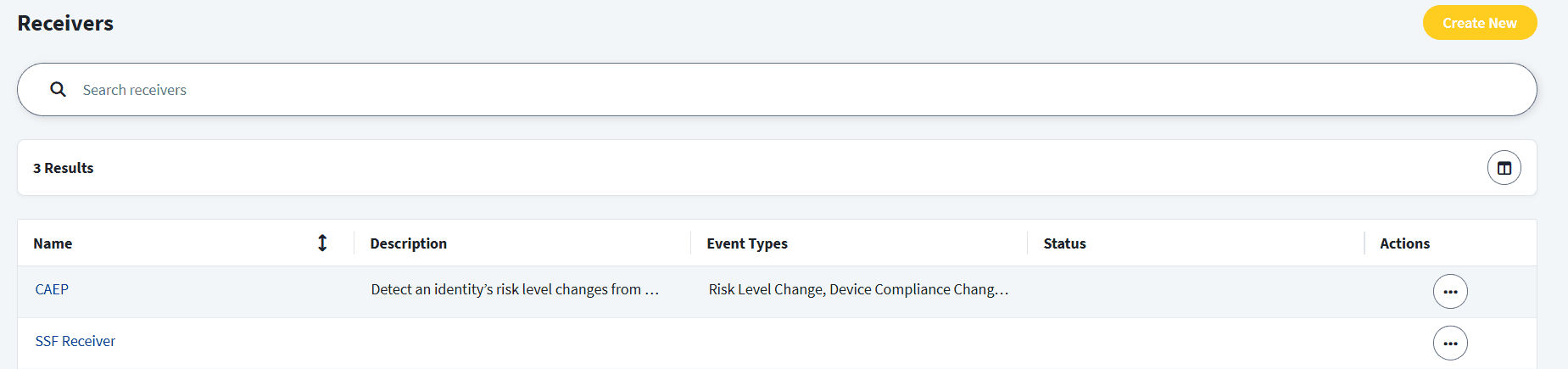
SailPoint ISC dashboard showing a list of configured SSF Receivers, including CAEP for detecting identity risk level and device compliance changes.
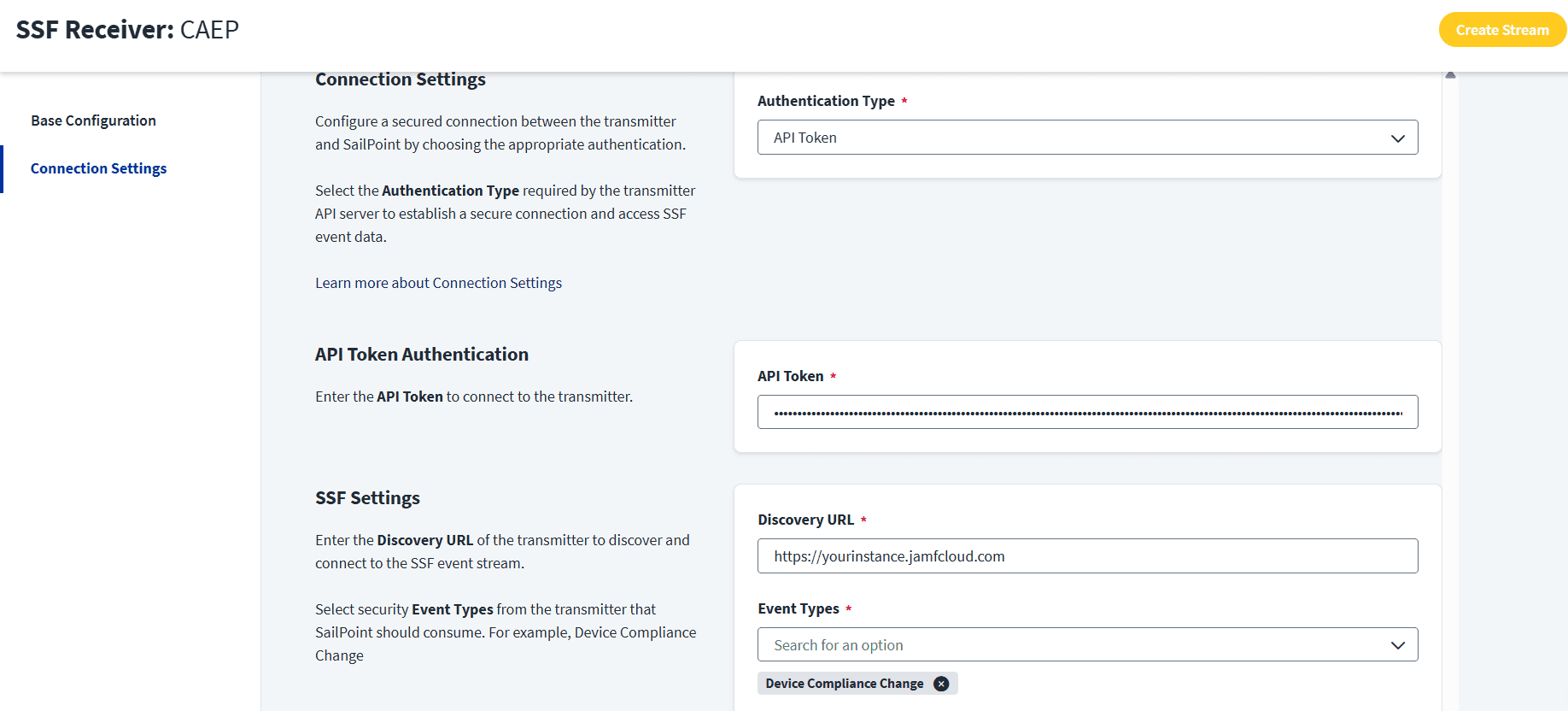
  1. In create new -> connection settings, Discovery URL is the base URL of the SSF transmitter (the external system) that SailPoint will contact to

  2. Create a new stream

SailPoint ISC interface showing connection settings for a CAEP SSF Receiver, including API Token authentication and a Jamf Discovery URL.

ISC Workflow for CAEP events

This workflow is triggered when an identity’s device is no longer compliant. The workflow disables the identity’s accounts in response to a potential threat.
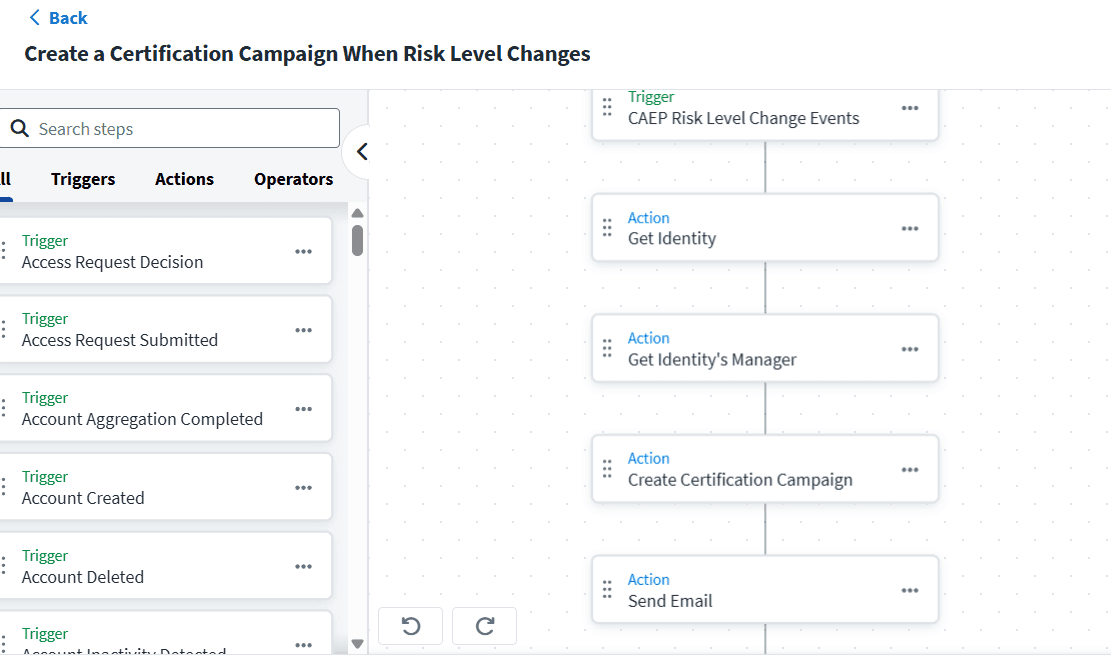
SailPoint ISC workflow builder showing a "CAEP Risk Level Change" trigger followed by actions to get identity details, identify managers, and initiate a certification campaign.

The CEAP event trigger will initiate a workflow when a CAEP event is received.


Stay tuned to our blog to see more posts about

Sailpoint products implementation and its related updates.

Stay tuned to our blog to see more posts about

Sailpoint products implementation and its related updates.

Category:

Security

Stay tuned to our blog to see more posts about

Sailpoint products implementation and its related updates.

Stay tuned to our blog to see more posts about

Sailpoint products implementation and its related updates.

Category:

Category:

Security

Security

Get your

Tailored Quote for your

Organisation

Get your

Tailored Quote for your

Organisation

Introduction

SSF is a way for security tools to talk to each other in real time.

It allows SailPoint to receive and react to security signals coming from other security tools such as endpoint management, device compliance, or threat detection platforms.

Instead of waiting for scheduled scans or manual reviews, SailPoint act immediately when something risky happens.
In SailPoint Identity Security Cloud, SailPoint receives security signals from other tools. Based on the signal, SailPoint can:

  • Block access

  • Revoke permissions

  • Trigger workflows

  • Add extra approvals

Shared Signals in SailPoint ISC

CAEP events are real time security signals sent to SailPoint from external systems (like device or security platforms).
SailPoint uses these signals to re-evaluate user access continuously.

1. Signal Transmitter

  • External security systems. Example: Jamf, endpoint or security tools

  • Detect events such as:

  1. Device Compliance Change - The user’s device becomes compliant or non-compliant

  2. Risk Level Change - The risk score of a user or session changes

  3. Token Claims Change - Information inside the access token (claims) has changed

  • These tools send security events (signals) to SailPoint

2. Stream

A stream is a logical event channel that carries security signals from an external system to SailPoint ISC.

3. Signal Receiver

SailPoint ISC acts as the SSF Receiver. It consumes these real time signals and correlates them with identity data

4. Automated Response

Based on the signal, SailPoint can:

  • Trigger workflows

  • Adjust access decisions

  • Revoke or limit access

  • Add additional approval steps

  • Enforce adaptive security controls

Setting up SSF in ISC

  1. Go to Admin -> Connections -> Shared Signals-> Create New

    Shared signals page lists all the connected streams and the event data received from transmitter.

SailPoint ISC dashboard showing a list of configured SSF Receivers, including CAEP for detecting identity risk level and device compliance changes.
  1. In create new -> connection settings, Discovery URL is the base URL of the SSF transmitter (the external system) that SailPoint will contact to

  2. Create a new stream

SailPoint ISC interface showing connection settings for a CAEP SSF Receiver, including API Token authentication and a Jamf Discovery URL.

ISC Workflow for CAEP events

This workflow is triggered when an identity’s device is no longer compliant. The workflow disables the identity’s accounts in response to a potential threat.

SailPoint ISC workflow builder showing a "CAEP Risk Level Change" trigger followed by actions to get identity details, identify managers, and initiate a certification campaign.

The CEAP event trigger will initiate a workflow when a CAEP event is received.