Professional accessing a holographic database interface on a laptop to manage centralized data.

SailPoint IIQ Entitlement Store: Centralized Data Management

Date Posted:

Category:

Security

Author:

Malarvanan

Professional accessing a holographic database interface on a laptop to manage centralized data.

SailPoint IIQ Entitlement Store: Centralized Data Management

Date Posted:

Category:

Security

Author:

Malarvanan

Professional accessing a holographic database interface on a laptop to manage centralized data.

SailPoint IIQ Entitlement Store: Centralized Data Management

Date Posted:

Category:

Security

Author:

Malarvanan

Listen Instead of Reading

Listen Instead of Reading

03:45 Min
00:00-03:45

Entitlement Store POC - SailPoint IIQ

1. Overview & Business Problem

1.1 The Problem

In a typical enterprise with hundreds of applications, each app must be individually onboarded into SailPoint IIQ. This creates:

  • separate configuration per application

  • individual file handling per application

  • 2000+ applications becomes unmanageable

  • processing logic in SailPoint for every app

1.2 The Solution — Entitlement Store

A centralized database-driven approach where all application entitlement data flows into ONE central database. SailPoint connects to this single database using a simple JDBC connector. New applications are onboarded by just changing one parameter (ApplicationID). All data processing logic lives at the database layer — not in SailPoint.

2. Architecture & Data Flow

SailPoint IdentityIQ entitlement data integration workflow from CSV ingestion to Identity Cube aggregation.

Database Design - Two Tables, One DB

  • Both tables live in the same database (entitlement_store_poc). The columns are identical except the Master table has one extra column — LastUpdated.

  • Staging Table receives raw data dumped from CSV files. No logic, just plain insert.

  • Master Table holds clean, production-ready data that SailPoint reads. It has one additional column LastUpdated which automatically records when each record was last changed.

  • The Master table additionally stores LastUpdated — the date and time when the record was last inserted or changed. This is automatically set by the database and does not need to be provided manually.

3. Implementation - Step by Step

Step 1 - Database & Tables

Database result grid listing entitlement_store_master and entitlement_store_staging tables.

Result: Both tables created in entitlement_store_poc database 

Step 2 - Sample CSV Files (5 Applications)

Files placed in: C:\EntitlementStore\csv_files\

CSV format:

Spreadsheet table showing user IDs, roles, role attributes, and HRMS application details.Windows File Explorer showing five application CSV files inside the EntitlementStore\csv_files folder.

Step 3 - SailPoint IIQ Task (CSV to Staging)

Custom BeanShell rule created as a scheduled task in IIQ.

What it does:

  • Connects to MySQL

  • Scans folder for all .csv files

  • Clears staging for each app (fresh load)

  • Reads CSV rows and batch inserts into Entitlement_Store_Staging

Design Logic: Zero business logic in SailPoint task. Only read CSV - insert staging. No comparisons, no deletes, no updates.

Result: 50 rows in Staging table (10 per app)

Database result grid showing staging table row counts across five applications: HRMS, FINANCE, IT, CRM, and ERP.

Step 4 - Stored Procedure (Staging to Master)

MySQL stored procedure handles all sync logic at DB level.

DB-side - Processing 1 lakh records in SailPoint = ~2 minutes. Same in MySQL stored procedure = ~10 seconds. 12x faster.

Logic per application:

  • DELETE records in Master not present in today's Staging (removed users)

  • INSERT new records from Staging into Master (new users/roles)

  • UPDATE existing records where data changed (role attribute changes)

Run with one line:

CALL sync_all_apps_to_master();

Result: 50 rows in Master table (10 per app)

Database result grid showing master table row counts across five applications: HRMS, FINANCE, IT, CRM, and ERP.

Step 5 - SailPoint JDBC Application Configuration

App 1:

JDBC connection and query configuration screen showing a SQL statement filtering Entitlement_Store_Master for APP1.Data preview table showing HRMS user entitlement records with the applicationId column highlighted for APP1.

App2:

JDBC connection and query configuration screen showing a SQL statement filtering Entitlement_Store_Master for APP2.Data preview table showing Finance user entitlement records with the applicationId column highlighted for APP2.

SQL Statement (Account Query):

SELECT

UserID   AS name,

UserID   AS id,

Role   AS role,

RoleAttribute   AS roleAttribute,

ApplicationID   AS applicationId,

ApplicationName AS applicationName

FROM Entitlement_Store_Master

WHERE ApplicationID = 'APP1'

To onboard a new app: Clone this connector, change 'APP1' to the new ApplicationID. That's it.

Result: Connection successful, aggregation working


Stay tuned to our blog to see more posts about

Sailpoint products implementation and its related updates.

Stay tuned to our blog to see more posts about SailPoint products implementation and its related updates.

Category:

Category:

Security

Security

For more detail or questions

For more detail or questions

Listen Instead of Reading
03:45 Min
00:00-03:45

Entitlement Store POC - SailPoint IIQ

1. Overview & Business Problem

1.1 The Problem

In a typical enterprise with hundreds of applications, each app must be individually onboarded into SailPoint IIQ. This creates:

  • separate configuration per application

  • individual file handling per application

  • 2000+ applications becomes unmanageable

  • processing logic in SailPoint for every app

1.2 The Solution — Entitlement Store

A centralized database-driven approach where all application entitlement data flows into ONE central database. SailPoint connects to this single database using a simple JDBC connector. New applications are onboarded by just changing one parameter (ApplicationID). All data processing logic lives at the database layer — not in SailPoint.

2. Architecture & Data Flow

SailPoint IdentityIQ entitlement data integration workflow from CSV ingestion to Identity Cube aggregation.

Database Design - Two Tables, One DB

  • Both tables live in the same database (entitlement_store_poc). The columns are identical except the Master table has one extra column — LastUpdated.

  • Staging Table receives raw data dumped from CSV files. No logic, just plain insert.

  • Master Table holds clean, production-ready data that SailPoint reads. It has one additional column LastUpdated which automatically records when each record was last changed.

  • The Master table additionally stores LastUpdated — the date and time when the record was last inserted or changed. This is automatically set by the database and does not need to be provided manually.

3. Implementation - Step by Step

Step 1 - Database & Tables

Database result grid listing entitlement_store_master and entitlement_store_staging tables.

Result: Both tables created in entitlement_store_poc database 

Step 2 - Sample CSV Files (5 Applications)

Files placed in: C:\EntitlementStore\csv_files\

CSV format:

Spreadsheet table showing user IDs, roles, role attributes, and HRMS application details.Windows File Explorer showing five application CSV files inside the EntitlementStore\csv_files folder.

Step 3 - SailPoint IIQ Task (CSV to Staging)

Custom BeanShell rule created as a scheduled task in IIQ.

What it does:

  • Connects to MySQL

  • Scans folder for all .csv files

  • Clears staging for each app (fresh load)

  • Reads CSV rows and batch inserts into Entitlement_Store_Staging

Design Logic: Zero business logic in SailPoint task. Only read CSV - insert staging. No comparisons, no deletes, no updates.

Result: 50 rows in Staging table (10 per app)

Database result grid showing staging table row counts across five applications: HRMS, FINANCE, IT, CRM, and ERP.

Step 4 - Stored Procedure (Staging to Master)

MySQL stored procedure handles all sync logic at DB level.

DB-side - Processing 1 lakh records in SailPoint = ~2 minutes. Same in MySQL stored procedure = ~10 seconds. 12x faster.

Logic per application:

  • DELETE records in Master not present in today's Staging (removed users)

  • INSERT new records from Staging into Master (new users/roles)

  • UPDATE existing records where data changed (role attribute changes)

Run with one line:

CALL sync_all_apps_to_master();

Result: 50 rows in Master table (10 per app)

Database result grid showing master table row counts across five applications: HRMS, FINANCE, IT, CRM, and ERP.

Step 5 - SailPoint JDBC Application Configuration

App 1:
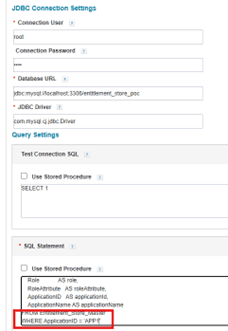
JDBC connection and query configuration screen showing a SQL statement filtering Entitlement_Store_Master for APP1.Data preview table showing HRMS user entitlement records with the applicationId column highlighted for APP1.

App2:

JDBC connection and query configuration screen showing a SQL statement filtering Entitlement_Store_Master for APP2.Data preview table showing Finance user entitlement records with the applicationId column highlighted for APP2.

SQL Statement (Account Query):

SELECT

UserID   AS name,

UserID   AS id,

Role   AS role,

RoleAttribute   AS roleAttribute,

ApplicationID   AS applicationId,

ApplicationName AS applicationName

FROM Entitlement_Store_Master

WHERE ApplicationID = 'APP1'

To onboard a new app: Clone this connector, change 'APP1' to the new ApplicationID. That's it.

Result: Connection successful, aggregation working


Stay tuned to our blog to see more posts about

Sailpoint products implementation and its related updates.

Category:

Security

For more detail or questions

For more detail or questions