
Adaptive Approvals
Date Posted:
24 Oct 2025
Category:
Security

Adaptive Approvals
Date Posted:
24 Oct 2025
Category:
Security

Adaptive Approvals
Date Posted:
24 Oct 2025
Category:
Security
Adaptive Approvals for Intelligent Access Control
Introduction Of Adaptive Approvals
Adaptive Approvals in SailPoint allow us to create approval processes for both access requests and task-based actions. It’s a workflow-based approval system. Admins use the Approval Policy and Generic Approval Policy Workflows actions to define the review process and assign reviewers. Identities, Managers, Access Item Owners, or Governance Groups are the reviewer type for this process. Admin can add reminders if the review is not completed, gets timeout if it is not completed in a specific time.
It supports different approval types
Single reviewer - Only one reviewer reviews the request.
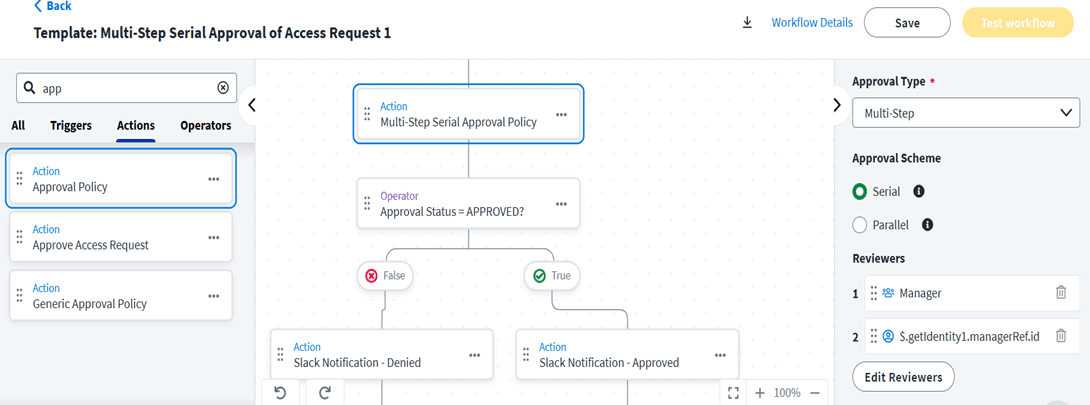
Multi-step approval - Multiple reviewers review this request all reviewers must approve/denies the request for the item to be approved/denied.
Quorum-based approval - Multiple reviewers review this request, based on the decision percentage of reviewers must approved/denied for the access item.
This approval policy can use approval schemes to perform the reviews:
Serial – The reviews are performed in a sequential order of review request.
Parallel – All reviewers are notified of the pending review at the same time.
Approval policy types
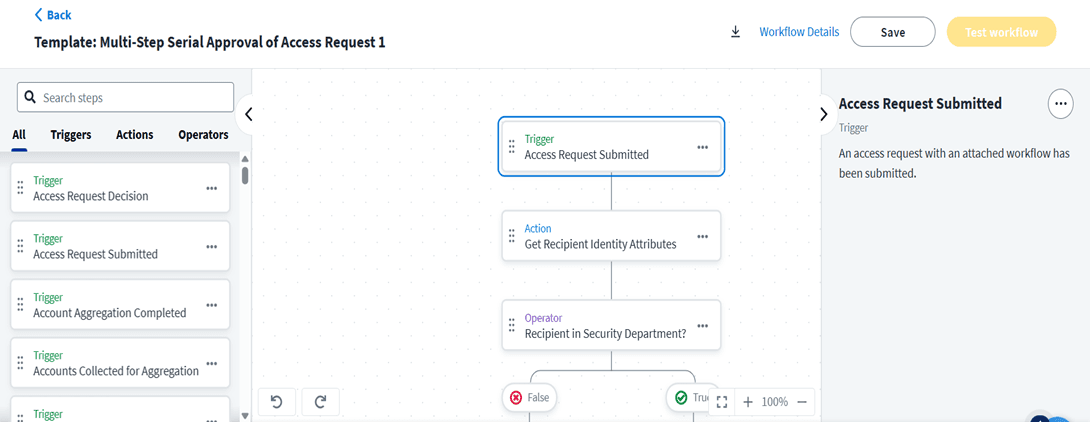
This will trigger when someone requests a role or entitlement or access profile. It is for access request-based approvals. Create a workflow using the Access Request Submitted trigger and the Approval Policy action to customize the approval policy. After workflow is configured and enabled.
Configuring Access Items for Adaptive Approvals
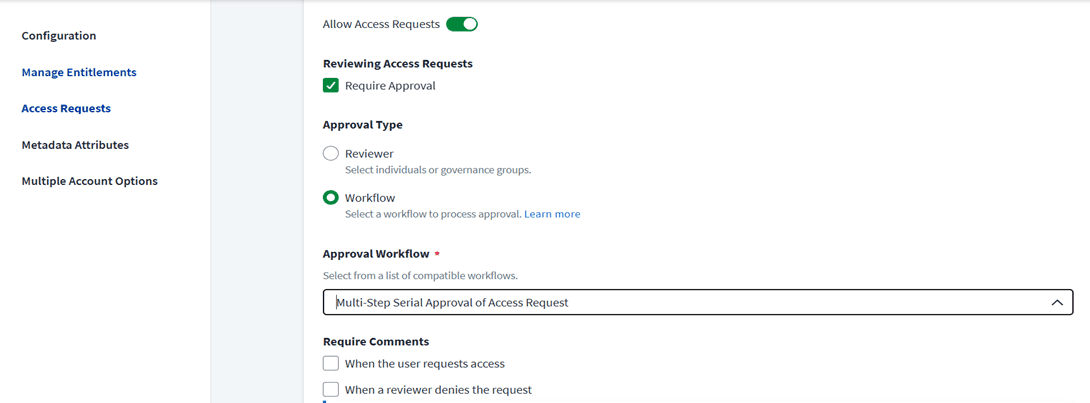
Configure an access items for adaptive approvals by requiring approval for the access item when requested and selecting a workflow as the Approval Type. After Configuring Access items for Adaptive Approvals after that when a user requests an access for an access object configured with an approval policy from the Request Center. After the request is submitted, the workflow is triggered. The review process for the access gets starts.
Tracking an Access Request
In Request Center -> View My Requests -> Select Details on the request to track.
The Request Status Tracker shows details about the access request along with the request process details showing each step in the access review process.
Reviewing Access Requests
Reviewers assigned through the Approval Policy action review the access requests on the Approvals page under the Access Requests tab.
From here, they can approve, deny, or reassign the request. Once the configured criteria have been met, the item is either approved or denied.
Generic Approval Policy
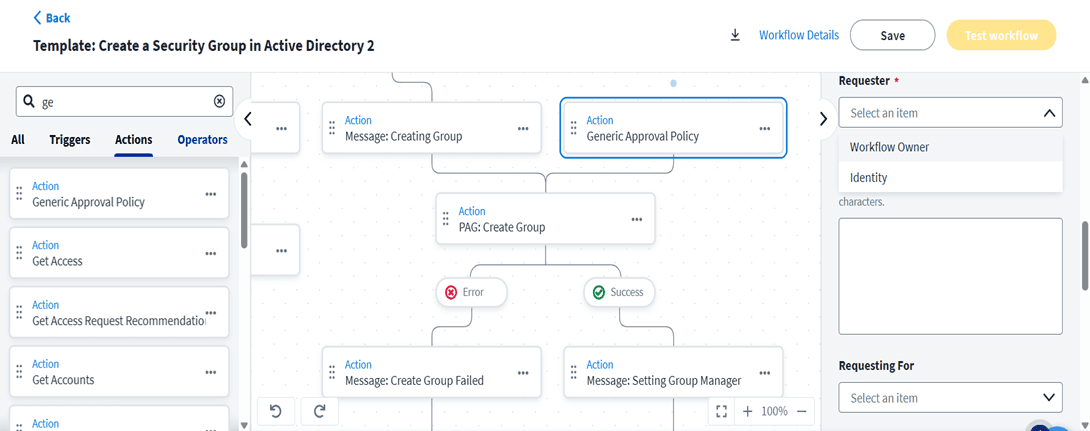
This is used for other task-based items like disabling an account or creating a group in AD. Create a workflow using the Generic Approval Policy action to customize the approval policy.
Templates for Adaptive Approvals
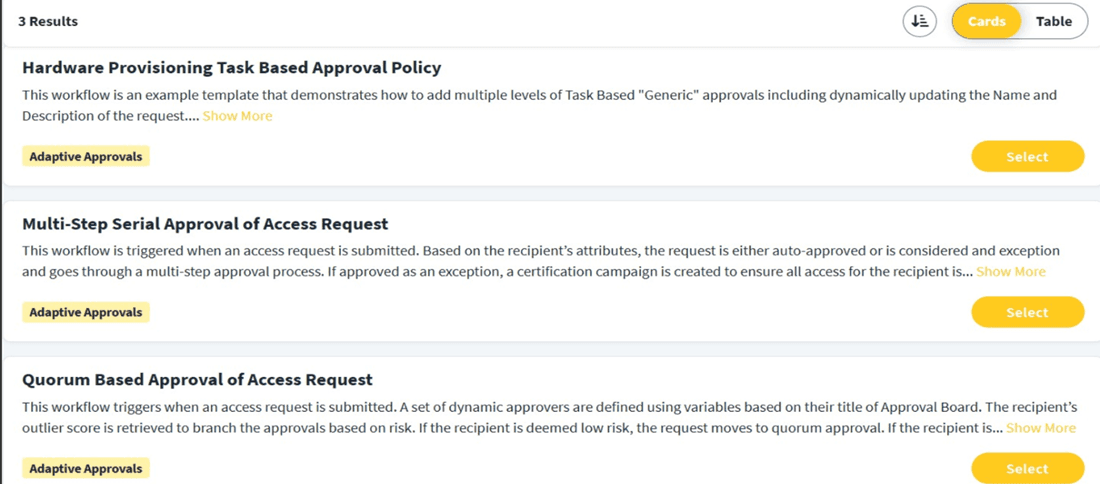
SailPoint offers pre-built Adaptive Approvals workflow templates to assist in getting started with Adaptive Approvals for access request approval policy and generic approval policy.
Stay tuned to our blog to see more posts about
Sailpoint products implementation and its related updates.
Stay tuned to our blog to see more posts about
Sailpoint products implementation and its related updates.
Category:
Security
Stay tuned to our blog to see more posts about
Sailpoint products implementation and its related updates.
Stay tuned to our blog to see more posts about
Sailpoint products implementation and its related updates.
Category:
Category:
Security
Security
BLS360's IDENTITY AI 2026
HACKATHON
BLS360's IDENTITY AI 2026 HACKATHON
Adaptive Approvals for Intelligent Access Control
Introduction Of Adaptive Approvals
Adaptive Approvals in SailPoint allow us to create approval processes for both access requests and task-based actions. It’s a workflow-based approval system. Admins use the Approval Policy and Generic Approval Policy Workflows actions to define the review process and assign reviewers. Identities, Managers, Access Item Owners, or Governance Groups are the reviewer type for this process. Admin can add reminders if the review is not completed, gets timeout if it is not completed in a specific time.
It supports different approval types
Single reviewer - Only one reviewer reviews the request.
Multi-step approval - Multiple reviewers review this request all reviewers must approve/denies the request for the item to be approved/denied.
Quorum-based approval - Multiple reviewers review this request, based on the decision percentage of reviewers must approved/denied for the access item.
This approval policy can use approval schemes to perform the reviews:
Serial – The reviews are performed in a sequential order of review request.
Parallel – All reviewers are notified of the pending review at the same time.
Approval policy types
This will trigger when someone requests a role or entitlement or access profile. It is for access request-based approvals. Create a workflow using the Access Request Submitted trigger and the Approval Policy action to customize the approval policy. After workflow is configured and enabled.


Configuring Access Items for Adaptive Approvals
Configure an access items for adaptive approvals by requiring approval for the access item when requested and selecting a workflow as the Approval Type. After Configuring Access items for Adaptive Approvals after that when a user requests an access for an access object configured with an approval policy from the Request Center. After the request is submitted, the workflow is triggered. The review process for the access gets starts.

Tracking an Access Request
In Request Center -> View My Requests -> Select Details on the request to track.
The Request Status Tracker shows details about the access request along with the request process details showing each step in the access review process.
Reviewing Access Requests
Reviewers assigned through the Approval Policy action review the access requests on the Approvals page under the Access Requests tab.
From here, they can approve, deny, or reassign the request. Once the configured criteria have been met, the item is either approved or denied.
Generic Approval Policy
This is used for other task-based items like disabling an account or creating a group in AD. Create a workflow using the Generic Approval Policy action to customize the approval policy.

Templates for Adaptive Approvals
SailPoint offers pre-built Adaptive Approvals workflow templates to assist in getting started with Adaptive Approvals for access request approval policy and generic approval policy.

