
Single Sign-On Setup between Entra ID, SailPoint ISC, & NERM
Date Posted:
3 Feb 2026
Category:
Security
Author:
Anjana

Single Sign-On Setup between Entra ID, SailPoint ISC, & NERM
Date Posted:
3 Feb 2026
Category:
Security
Author:
Anjana

Single Sign-On Setup between Entra ID, SailPoint ISC, & NERM
Date Posted:
3 Feb 2026
Category:
Security
Author:
Anjana
Introduction
In SailPoint ISC, SSO setup is essential because it allows admins, managers, and other authorized users to log in to SailPoint through a single point of authentication, rather than signing in repeatedly using passwords or separate MFA challenges. This significantly improves the user experience by reducing login frequency and ensuring consistent access across integrated systems.
Integration between Entra ID - SailPoint ISC - NERM
In this Integration Entra ID acts as the Identity Provider and SailPoint acts as Service Provider using SAML 2.0. Also for Non-Employee Risk Management, SailPoint acts as the Identity Provider and NERM acts as the Service Provider. To achieve this, the identity is supposed to have account in Entra ID, SailPoint and NERM.
Configuration on the Entra ID Tenant
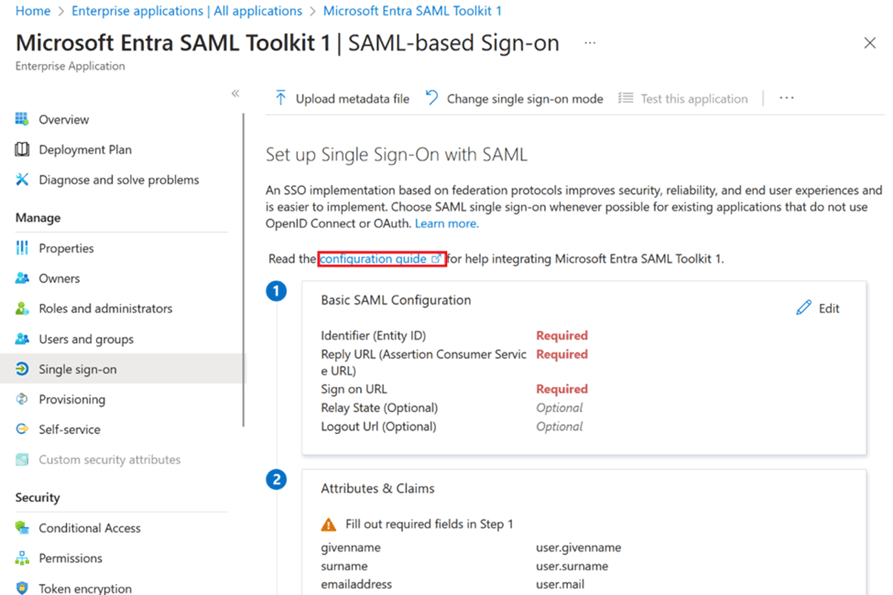
In the Microsoft Entra Admin Center a new enterprise application needs to be created to integrate SailPoint ISC. After navigating to the SSO page the Entity ID, Reply URL and Sign On URL from SailPoint have to be configured.
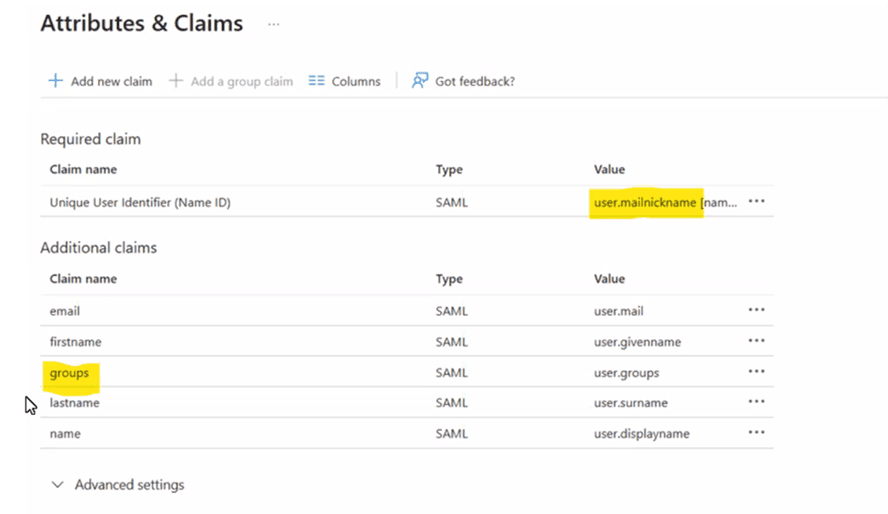
The Attribute claims, required claims and group claims need to be setup. The Unique Identifier configured here as part of the required claims in Email ID.
Configuring SailPoint as Service Provider and Identity Provider for NERM
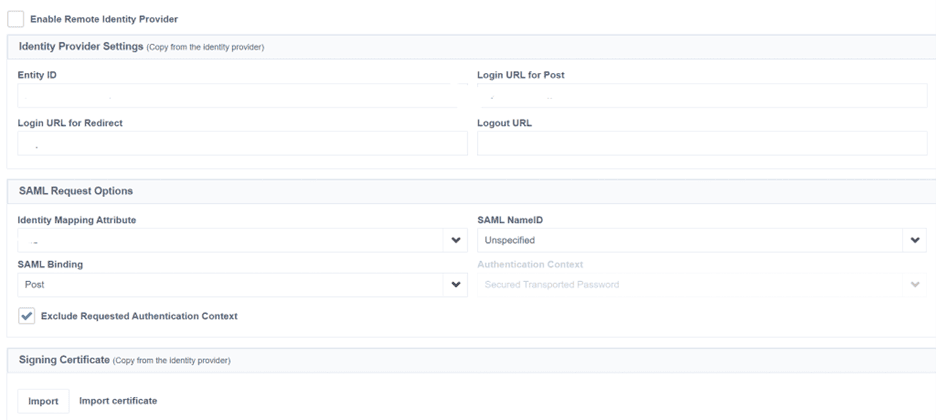
After navigating to the Service Provider Page in SailPoint ISC and enabling the Remote Identity provider the IDP entity ID and SSO URL from Entra ID and the Entra ID signing certificate need to be configured. Under the SAML Request options, the Email ID needs to be configured as the Identity Mapping Attribute. This helps in the correlation when the user tries to login.
Configuring NERM as the Service Provider
On the NERM tenant, the login attribute of the System User needs to be set as Email ID as well. This is because, Email ID is mapped as Identity Attribute for SAML on the SailPoint side, this attribute will be used as the identifier during single sign on on the NERM tenant. If some other attribute is used as unique identifier on NERM, then NERM will consider the user as a new user and create a duplicate account.
Test SSO Authentication
Access SailPoint ISC using the SSO login option
Verify redirect to Entra ID
Authenticate with Entra credentials
Validate SAML Assertion
Use a SAML tracer (browser extension)
Confirm:
● Assertion is signed
● NameID format and value
● Required claims are present
● Group claims (if configured)
Post-Login Validation
User is successfully authenticated
User lands on the intended ISC page
Identity is created if JIT is enabled
Conclusion
The above integrations and connections will help facilitate the SSO connections between Entra ID, SailPoint and Non-Employee Risk Management providing seamless login for the user by avoiding passwords and MFA. This also helps avoid creating duplicate accounts on SailPoint and NERM tenants.
Stay tuned to our blog to see more posts about
Sailpoint products implementation and its related updates.
Stay tuned to our blog to see more posts about
Sailpoint products implementation and its related updates.
Category:
Security
Stay tuned to our blog to see more posts about
Sailpoint products implementation and its related updates.
Stay tuned to our blog to see more posts about
Sailpoint products implementation and its related updates.
Category:
Category:
Security
Security
Get your
Tailored Quote for your
Organisation
Get your
Tailored Quote for your
Organisation
Introduction
In SailPoint ISC, SSO setup is essential because it allows admins, managers, and other authorized users to log in to SailPoint through a single point of authentication, rather than signing in repeatedly using passwords or separate MFA challenges. This significantly improves the user experience by reducing login frequency and ensuring consistent access across integrated systems.
Integration between Entra ID - SailPoint ISC - NERM
In this Integration Entra ID acts as the Identity Provider and SailPoint acts as Service Provider using SAML 2.0. Also for Non-Employee Risk Management, SailPoint acts as the Identity Provider and NERM acts as the Service Provider. To achieve this, the identity is supposed to have account in Entra ID, SailPoint and NERM.
Configuration on the Entra ID Tenant
In the Microsoft Entra Admin Center a new enterprise application needs to be created to integrate SailPoint ISC. After navigating to the SSO page the Entity ID, Reply URL and Sign On URL from SailPoint have to be configured.

The Attribute claims, required claims and group claims need to be setup. The Unique Identifier configured here as part of the required claims in Email ID.

Configuring SailPoint as Service Provider and Identity Provider for NERM
After navigating to the Service Provider Page in SailPoint ISC and enabling the Remote Identity provider the IDP entity ID and SSO URL from Entra ID and the Entra ID signing certificate need to be configured. Under the SAML Request options, the Email ID needs to be configured as the Identity Mapping Attribute. This helps in the correlation when the user tries to login.

Configuring NERM as the Service Provider
On the NERM tenant, the login attribute of the System User needs to be set as Email ID as well. This is because, Email ID is mapped as Identity Attribute for SAML on the SailPoint side, this attribute will be used as the identifier during single sign on on the NERM tenant. If some other attribute is used as unique identifier on NERM, then NERM will consider the user as a new user and create a duplicate account.
Test SSO Authentication
Access SailPoint ISC using the SSO login option
Verify redirect to Entra ID
Authenticate with Entra credentials
Validate SAML Assertion
Use a SAML tracer (browser extension)
Confirm:
● Assertion is signed
● NameID format and value
● Required claims are present
● Group claims (if configured)
Post-Login Validation
User is successfully authenticated
User lands on the intended ISC page
Identity is created if JIT is enabled
Conclusion
The above integrations and connections will help facilitate the SSO connections between Entra ID, SailPoint and Non-Employee Risk Management providing seamless login for the user by avoiding passwords and MFA. This also helps avoid creating duplicate accounts on SailPoint and NERM tenants.
