Laptop displaying a glowing red envelope surrounded by digital warning icons, symbolizing email security risks.

SailPoint ISC Workflows: Sending Email Invitations Securely

Date Posted:

Category:

Security

Author:

Krishna

Laptop displaying a glowing red envelope surrounded by digital warning icons, symbolizing email security risks.

SailPoint ISC Workflows: Sending Email Invitations Securely

Date Posted:

Category:

Security

Author:

Krishna

Laptop displaying a glowing red envelope surrounded by digital warning icons, symbolizing email security risks.

SailPoint ISC Workflows: Sending Email Invitations Securely

Date Posted:

Category:

Security

Author:

Krishna

How SailPoint ISC Workflows Send Email Invitations to the Right Users

Introduction

Workflows make it convenient to automate critical tasks by providing a no code/low code approach. One such crucial use case is automating the process of sending invitation emails to newly on-boarded users.

In large organizations, there are multiple authoritative sources, with various types of users, which create identities, mandating specific checks to verify user attributes and source system before sending out an email. 

This method ensures that email invitations are sent the appropriate users urging them claim their accounts and setup the account password therefore enhancing security and user experience ultimately avoiding unexpected emails. Admins leverage workflows to allow automated processing of critical tasks, decreasing the need for manual intervention and eliminating possible errors and delays in sending out email invites to new hires for an organization.

Process Design

The workflow is initiated when the trigger condition, which is based on any changes to the user's email attribute, is achieved. The identity’s user type and their corresponding authoritative source are used to filter out the identities that are introduced into the workflow.

A completeness and accuracy check is required to ensure the identity has the required attributes for the validation and is of a valid format. Furthermore, the email attribute included in the trigger must have an oldValue of Null, and its newValue should be a valid email address.

A validation is carried out to guarantee only users in certain Lifecycle States, such as Active, should receive invites. This is necessary to make sure users in terminated/deleted LCS do not receive email invites.

In the instance of a user having previously claimed the account being included in the workflow, a check is carried out to verify user’s claim status. This flag is based on a series on logic calculations considering the MFA registration status and authentication methods.

The emails can be customized to include the actions each user type is required to perform to set up and claim their account. Once all the required checks are performed to ensure the emails aren’t sent to unintended users, invites will be sent to the user’s personal email address. Identities which fail the checks will be excluded and the workflow will be terminated.
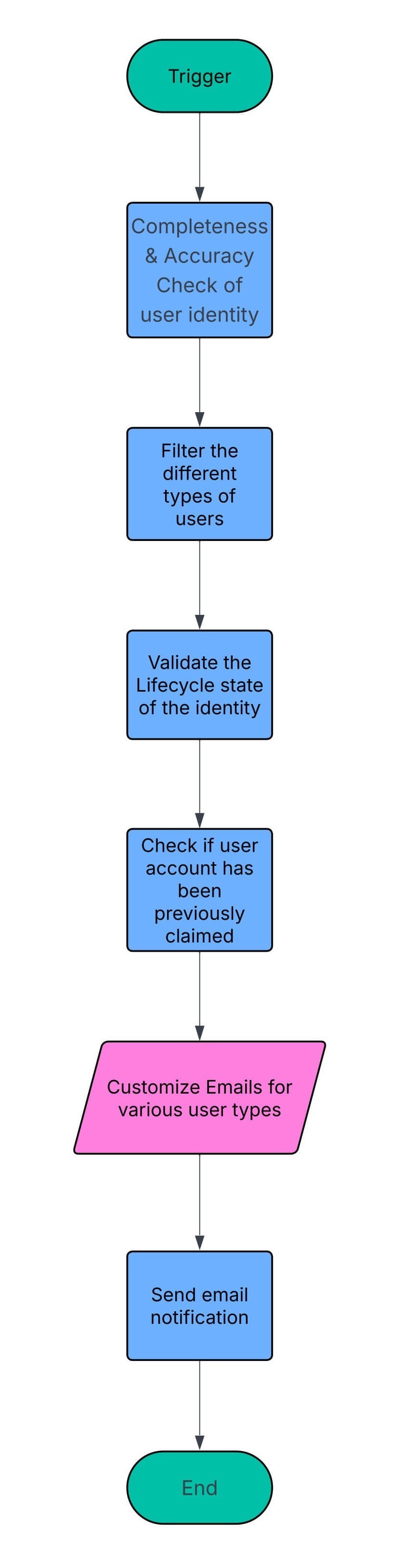
Workflow diagram for an automated invitation email process, including identity validation, user filtering, and customized notification delivery.


Stay tuned to our blog to see more posts about

Sailpoint products implementation and its related updates.

Stay tuned to our blog to see more posts about

Sailpoint products implementation and its related updates.

Category:

Security

Stay tuned to our blog to see more posts about

Sailpoint products implementation and its related updates.

Stay tuned to our blog to see more posts about

Sailpoint products implementation and its related updates.

Category:

Category:

Security

Security

Get your

Tailored Quote for your

Organisation

Get your

Tailored Quote for your

Organisation

How SailPoint ISC Workflows Send Email Invitations to the Right Users

Introduction

Workflows make it convenient to automate critical tasks by providing a no code/low code approach. One such crucial use case is automating the process of sending invitation emails to newly on-boarded users.

In large organizations, there are multiple authoritative sources, with various types of users, which create identities, mandating specific checks to verify user attributes and source system before sending out an email. 

This method ensures that email invitations are sent the appropriate users urging them claim their accounts and setup the account password therefore enhancing security and user experience ultimately avoiding unexpected emails. Admins leverage workflows to allow automated processing of critical tasks, decreasing the need for manual intervention and eliminating possible errors and delays in sending out email invites to new hires for an organization.

Process Design

The workflow is initiated when the trigger condition, which is based on any changes to the user's email attribute, is achieved. The identity’s user type and their corresponding authoritative source are used to filter out the identities that are introduced into the workflow.

A completeness and accuracy check is required to ensure the identity has the required attributes for the validation and is of a valid format. Furthermore, the email attribute included in the trigger must have an oldValue of Null, and its newValue should be a valid email address.

A validation is carried out to guarantee only users in certain Lifecycle States, such as Active, should receive invites. This is necessary to make sure users in terminated/deleted LCS do not receive email invites.

In the instance of a user having previously claimed the account being included in the workflow, a check is carried out to verify user’s claim status. This flag is based on a series on logic calculations considering the MFA registration status and authentication methods.

The emails can be customized to include the actions each user type is required to perform to set up and claim their account. Once all the required checks are performed to ensure the emails aren’t sent to unintended users, invites will be sent to the user’s personal email address. Identities which fail the checks will be excluded and the workflow will be terminated.

Workflow diagram for an automated invitation email process, including identity validation, user filtering, and customized notification delivery.